
Keywords Everywhere is a browser extension that shows keyword data on the pages where you already work. Search for something on Google, and the monthly search volume, cost per click, and competition score appear right there in the results. The same thing happens on YouTube, Amazon, eBay, Etsy, Bing, and more than a dozen other sites.
It is a different kind of product from the platforms we have reviewed so far in this series. Semrush, Ahrefs, SE Ranking, and Moz Pro are destinations. You open them, run a report, and export what you need. Keywords Everywhere does not ask you to go anywhere. It adds a layer of data on top of your normal browsing.
The tool has been running since 2015 and is built by Axeman Technology Solutions LLP, a small partnership based in Mumbai. It now serves more than 1.6 million users. This Keywords Everywhere review covers what the extension does well, where its keyword data comes from, and why its credit system is the thing most buyers misjudge. All figures were checked against the company’s own pages, and anything we could not confirm is flagged for a final check before publication.
Some links in this review are affiliate links. If you buy through them, ZoneVerified may earn a commission at no extra cost to you. This never affects our scores or conclusions. Read our transparency and affiliate disclosure.
The fastest way to see Google’s own keyword numbers while you work, at a price no full platform can match. The credit system, and the fact that credits expire, is the catch.
Bloggers, content writers, ecommerce sellers, and SEOs who want quick search volume checks without opening another tool.
You need rank tracking, site audits, backlink analysis, or a keyword difficulty score, since this tool has none of them.
Get Started with Keywords Everywhere
Ready to uncover valuable keyword opportunities and SEO insights?
Every ZoneVerified review follows the same evidence-first editorial process. Wherever we have genuine access to a tool, we test it ourselves, then support our findings with official documentation and recurring user consensus, and clearly distinguish first-hand experience from research-based conclusions.
Our ratings are independent and reflect our editorial assessment of each product alone. Commercial relationships never determine how software is reviewed, scored, or recommended, and our conclusions are never influenced by affiliate partnerships. Learn more about our Transparency Policy and Software Review Methodology.
What’s New in 2026
A few changes matter if you are weighing this tool up now.
- An MCP server. Keywords Everywhere now publishes a Model Context Protocol server. That lets AI assistants pull its keyword data directly through natural language. Very few tools in this category have shipped one yet.
- LLM prompt templates, free to use. The extension adds ready-made prompt templates inside ChatGPT, Claude, Gemini and DeepSeek. These do not cost credits.
- AI Overview metrics. The tool now reports data on Google’s AI Overview results, which matters as those answers take up more of the page.
- An AI Brand Tracker. A separate product tracks how often a brand shows up in AI answers.
- A published security overview. The company put out a detailed security document, last updated in July 2026. It is unusually open, and we cover it in the Security section below.
Software Overview
Keywords Everywhere installs in Chrome, Firefox, or Edge in one click. You then sign up for a free API key, paste it into the extension, and the data starts appearing. There is no dashboard to learn and no separate site to visit.
The paid data covers search volume, cost per click, competition, and trend history going back twelve months and further. You also get traffic metrics, Moz link metrics, bulk keyword lookups, and gap analysis. The free tier covers the social side: Instagram hashtags and engagement, Pinterest insights, X engagement metrics, and the LLM prompt templates.
What the tool does not do is just as important. There is no rank tracking, no site audit, and no backlink index of its own. The company says so plainly in its own API documentation, which is a refreshing change from vendors who blur the edges of what they sell.
- ✓ Search volume comes from Google Keyword Planner, the same dataset Google gives its advertisers
- ✓ Shows exact monthly volume in Keyword Planner without needing an active Google Ads campaign
- ✓ Almost no learning curve, since the data appears inside the sites you already use
- ✓ The cheapest paid entry point in this review series, plus a genuine free tier for social and AI features
- ✓ An unusually honest security overview, and clear labelling of what each metric does and does not mean
- − Credits expire twelve months after purchase, whether you have used them or not
- − A single Google search can spend more than fifty credits, so budgets run down faster than most people expect
- − No rank tracking, no site audit, and no backlink index of its own, so it cannot replace a full platform
- − No keyword difficulty score; the competition figure measures advertiser demand, not how hard a term is to rank for
- − Annual billing only, with no monthly option, no Safari version, and no mobile app
If the free features are all you need for now, you can install the extension and try it at no cost before deciding on a paid plan.
The Trade-Off
The deal Keywords Everywhere offers is simple. You give up depth, and you get speed.
You will not find rank tracking, audits, or link analysis here. What you get instead is Google’s own volume data appearing exactly where you are already looking, for a fraction of what a platform costs. If your day involves checking a lot of keywords quickly, that saves real time. If you need to know how hard a keyword is to rank for, or how your positions moved this week, this tool cannot tell you.
Who It’s Best For
This extension suits bloggers, content writers, and ecommerce sellers who research keywords constantly but do not need a full SEO suite. It works well for people who already do research inside Google, YouTube, or Amazon and simply want numbers attached to what they see.
It also fits SEOs who already pay for Semrush or Ahrefs. At this price, it is a cheap second opinion and a faster way to check a keyword mid-task. Teams get value too, since one plan covers several seats sharing a single credit pool.
Who Should Look Elsewhere
If you need rank tracking, site audits, or backlink data, this is not the tool. Those jobs belong to the platforms reviewed elsewhere in this series.
Heavy researchers should also think carefully. Credits disappear quickly once you are running dozens of searches a day, and they expire after a year. If your work is high volume and continuous, a flat-rate platform may cost less in practice. Anyone who works on a Mac in Safari, or mostly on a phone, is also out of luck, since neither is supported.
Grounded in years of hands-on SEO work, SEO tools are only as reliable as the data behind them, so data quality and accuracy carries the most weight — a tool that reports the wrong numbers is more harmful than one that simply does less.
Whether the data can be trusted: index and database size and freshness, and the accuracy of search volumes, keyword difficulty, traffic estimates, and rank tracking, checked against real data such as Google Search Console where possible.
Depth across keyword research, rank tracking, backlinks, site audits, and competitor and content tools, how well they connect, and what’s gated to higher tiers or metered by credits.
How quickly a user becomes productive in daily use, with dashboards that surface insight rather than bury it.
What the tool delivers against its cost, including how price scales with usage limits and credits, judged against realistic alternatives.
How well it connects to the rest of an SEO stack — Search Console, Analytics, Google Ads, Looker Studio — through native integrations and an API.
Documentation, learning resources, and direct help, and how that shifts across tiers.
Security posture, certifications where applicable, privacy, data handling, and access controls, verified against the vendor’s trust documentation. A tool that falls short is flagged regardless of how it scores elsewhere.
How overall scores are calculated. Scores are assigned dimension by dimension before the overall rating is calculated using the fixed weights above, never adjusted to reach a preferred outcome. Every review states plainly where a judgment rests on first-hand testing versus official documentation and user consensus.
Read our complete software review methodology.
Core Features
Everything in Keywords Everywhere is built around one idea: put the data where the work happens. The sections below cover what that looks like in practice.
Keyword data inside search results
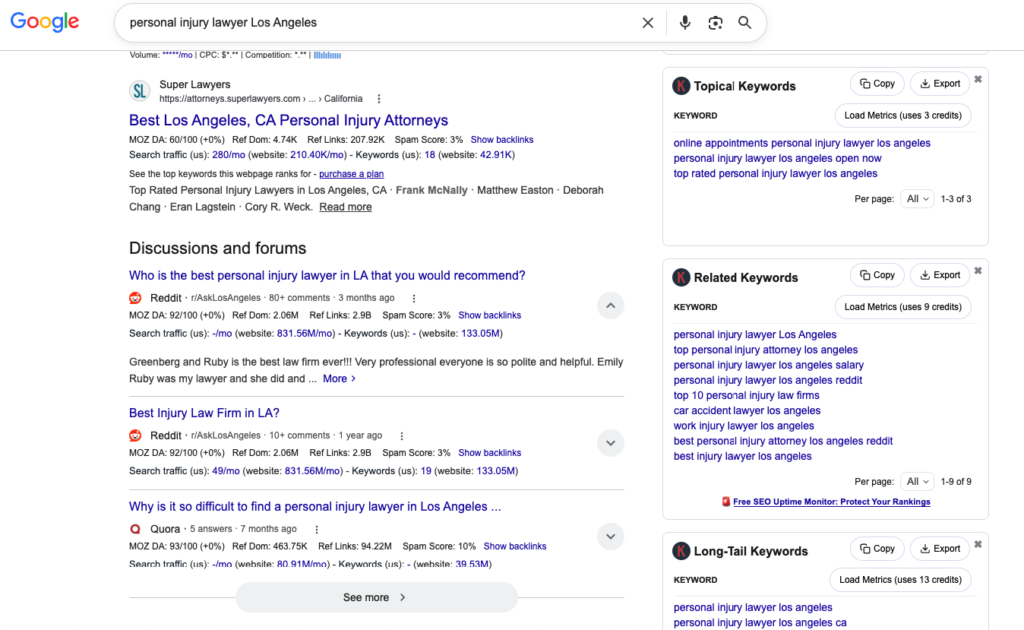
This is the feature the tool is known for. Run a search on Google, and the extension adds monthly search volume, cost per click, and a competition score under the search bar. It then fills side panels with related keywords, People Also Search For terms, and long-tail suggestions, each with its own numbers.
- Where it works: Google, Bing, YouTube, Amazon, eBay, Etsy, the Play Store, Google Trends, Search Console, Analytics, and Keyword Planner.
- What you see: volume, CPC, competition, and trend charts covering the last twelve months and longer history.
- Cost per search: one credit per keyword fetched. On YouTube or Amazon, that is one credit. On Google, where several panels fill at once, it is far more.
The time this saves is the whole point. Normally you would spot an interesting phrase, copy it, switch tabs, paste it into a research tool, and read the number. Here the number is already on screen. For anyone who researches while browsing rather than in dedicated sessions, that difference adds up fast.
The obvious follow-up question is where those numbers actually come from.
Where the data comes from
Keywords Everywhere pulls its volume figures from Google Keyword Planner. That is the same dataset Google shows its own advertisers. In the settings you can choose Keyword Planner data alone, or a blend of Keyword Planner and clickstream data.
- A real advantage: Keyword Planner normally hides exact search volumes unless you run an active Google Ads campaign with sufficient spend. Keywords Everywhere uses Keyword Planner data as its source and presents that information directly within supported search platforms, making keyword research more convenient.
- Honest labelling: the competition score is Google’s advertiser competition metric, on a scale of 0 to 1. The company states clearly that this is not a ranking difficulty score.
- What is missing: because the tool has no index of its own, it offers no keyword difficulty metric and no rank tracking.
That sourcing decision shapes the whole product. Most tools build their own database and model volumes themselves. Keywords Everywhere passes through Google’s numbers instead. For volume, that is about as close to the source as a commercial tool gets. The trade is that you inherit Keyword Planner’s known quirks too, including its habit of grouping similar phrases together.
Beyond search engines, the extension reaches into places most SEO tools ignore.
Social, ecommerce, and AI features
The free tier covers a set of features that need no credits at all. These include an Instagram hashtag generator with engagement metrics, Pinterest insights, X engagement metrics, and prompt templates that appear inside ChatGPT, Claude, Gemini, and DeepSeek.
- Ecommerce research: volume data on Amazon, eBay, and Etsy helps sellers see what buyers actually type.
- AI Overview metrics: the tool now reports on Google’s AI Overview results, which increasingly sit above the organic listings.
- Free to use: none of the social or LLM prompt features consume credits.
This breadth is unusual for something that costs so little. The social metrics will not replace a proper social tool, and the prompt templates are a convenience rather than a serious feature. But they cost nothing, and the ecommerce data is genuinely useful for anyone selling on those marketplaces.
For heavier work, the tool offers a few ways to move faster.
Bulk lookups, gap analysis, and the API
Every paid plan includes bulk keyword uploads, so you can paste a list and get data for all of it at once. Gap analysis shows which keywords a competitor ranks for that you do not. There is also a documented API and, newer in 2026, an MCP server that lets AI assistants query the data directly.
- Bulk uploads: the practical way to research at scale without burning credits on interface panels you do not need.
- API and MCP: both are available on paid plans, with the MCP server making it one of the few tools in this category an AI assistant can use directly.
- Related products: the company also runs SEO Minion, a rank tracker, a website monitor, and an AI Brand Tracker, though these are separate products rather than parts of this one.
The MCP server deserves a note. Screaming Frog is the only other tool in this series to ship one, and both did so ahead of platforms many times their size. For anyone building AI-assisted research workflows, that matters more than the feature list suggests.
Data Quality and Accuracy
Data accuracy carries the most weight in our scoring, so this section decides most of the result. Keywords Everywhere presents an unusual case, and it is worth explaining clearly.
Most tools in this category build their own keyword database. They gather data, model it, and publish an estimate. Keywords Everywhere does not do that. It passes through Google Keyword Planner figures, which is the dataset Google gives to its own advertisers. For search volume, that is a genuinely strong position. You are not reading a vendor’s guess at what Google knows. You are reading what Google reports.
The tool also solves a real problem. Keyword Planner only reveals exact volumes to accounts running an active Google Ads campaign with enough spend behind it. Everyone else sees wide ranges. This extension shows the exact number without requiring any ad spend, which is a legitimate and useful thing to sell.
There are limits, and they are significant. Keyword Planner has known quirks. It groups similar phrases together, which can hide differences between terms you would target separately. It is built for advertisers, so it sometimes reports no volume for phrases that clearly do get traffic. An optional clickstream blend is available in the settings, though at least one reviewer reported seeing little difference when switching it on.
The bigger issue for this dimension is scope. Our rubric weighs index size and freshness, volume accuracy, keyword difficulty, traffic estimates, and rank tracking. Keywords Everywhere has no index of its own. It offers no keyword difficulty score. It does no rank tracking at all, and the company says so plainly in its own documentation. Three of the five things this dimension measures are simply absent.
One older practitioner report, from 2024, found that volumes here ran higher and difficulty figures lower than in Semrush and Ahrefs. That source is roughly two years old now, so treat it as a pointer rather than a finding.
Our conclusion is that this tool’s data is trustworthy for what it covers, and honest about what it does not cover. The volume figures come from the best commercial source available. But the scope is narrow, and a buyer who needs difficulty scoring or rank data will not find it here. That mix earns a middling score on a dimension that rewards breadth as well as accuracy.
Features
Judged against our feature criteria, Keywords Everywhere is deliberately lopsided. Of the areas we assess, keyword research, rank tracking, backlinks, site audits, competitor tools, and content tools, it serves one properly and touches a second. Keyword research is well covered, and gap analysis gives it a light competitor angle. Rank tracking, site audits, and backlink analysis are absent by design.
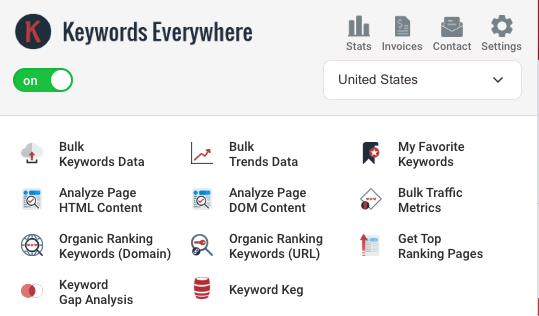
What it does offer is breadth of a different kind. The extension works across more than a dozen sites, from Google and Bing to Amazon, Etsy, YouTube, Instagram, and Pinterest. It bundles Moz link metrics, traffic metrics, bulk lookups, an API, and an MCP server. Higher plans add SEO Minion and a set of training courses. Nothing is metered beyond the credits themselves, and every paid plan unlocks every data feature, with the tiers differing only in credits, seats, and extras.
That is a clean, honest structure. It also means the score has to reflect a tool that is excellent at one job and absent from most others.
Ease of Use
This is where Keywords Everywhere is strongest, and the reason it has 1.6 million users.
There is nothing to learn. You install the extension, paste in a free API key, and the data appears on pages you already visit. There is no dashboard, no onboarding, and no report builder. Compared with the learning curves on Semrush or Ahrefs, both of which reviewers regularly describe as steep, this is a different world.
Two things hold the score back. The first is credit management. You have to think about how much data each search consumes, and that is genuine mental overhead a flat-rate tool does not impose. The vendor’s own example makes the point: a single Google search that returns 8 related keywords, 20 People Also Search For terms, and 25 long-tail suggestions spends 54 credits, not one. Most new users do not expect that.
The second is platform support. The extension runs on Chrome, Firefox, and Edge only. There is no Safari version and no mobile app.
Pricing and Value
Keywords Everywhere sells four annual plans, and the tiers differ only in credits, user seats, and a few extras. Bronze includes 100,000 credits and one seat. Silver includes 400,000 credits, three seats, and SEO Minion. Gold includes 2 million credits, ten seats, SEO Minion, and the full set of Rapid Level Up courses. Platinum includes 8 million credits and twenty seats with the same extras.
Keywords Everywhere offers a free tier for social and LLM prompt features. Paid plans are billed annually, starting with Bronze (from $84/year) and scaling to Platinum ($1,440/year), with higher tiers adding more credits, user seats, and bundled extras. Credits expire after 12 months, so estimate your usage carefully before choosing a plan.
Reported pricing runs at roughly $84, $168, $480, and $1,440 per year respectively, though these figures come from third-party sources rather than the vendor’s help pages and should be confirmed before you buy. Even at the top tier, this is far cheaper than an annual subscription to any full platform in this series. There is also a real free tier covering the social and LLM prompt features.
Billing is annual only. The company explains why in its own FAQ: processing small monthly payments would cost more in fees than the payments are worth. That is a straight answer, and more transparent than most vendors manage.
Two things temper the value case. Credits expire twelve months after purchase, used or not, and reviewers raise this repeatedly. If you buy a large bundle and your workload dips, that money is gone. Second, credits go faster than people expect, given a single Google search can spend more than fifty. Top-ups exist, but they add to the real annual cost.
The refund policy is worth crediting. You cancel from inside the extension, and if an automatic renewal catches you out, the company states it will refund in full if you email within a week. That is a notably fairer stance than several larger tools in this series, where refund friction is a recurring complaint.
Prices can change, so it is worth visiting Keywords Everywhere before you commit to a tier.
Integrations
For a browser extension, the connection points are broader than you would expect. The tool reads and enriches pages inside Google Search Console, Google Analytics, Google Trends, and Google Keyword Planner, so its data sits alongside your own numbers rather than in a separate report.
There is a documented API for programmatic access, and the MCP server lets AI assistants query keyword data through natural language. Moz link metrics are pulled in for link data, since the tool holds no backlink index of its own.
The gaps are worth naming. We found no Looker Studio connector and no native automation platform links of the Zapier or Make variety. Everything runs inside the browser, so this enriches your own workflow rather than feeding a reporting pipeline. Within those limits, the coverage is sensible, and the MCP server is genuinely ahead of the curve.
Customer Support
Support runs through email and documentation rather than live channels. There is no live chat or phone line, which is expected from a small, bootstrapped team.
What the company does well is documentation. Its purchase guide, FAQ, API documentation, and security overview are clear, current, and specific. Keywords Everywhere‘s FAQ answers awkward questions directly, including how credits are consumed and why monthly billing is not offered. The refund policy is stated in plain terms rather than buried.
We found less public evidence about response times and ticket handling than we would like, so this score leans on documentation quality and policy transparency rather than a strong consensus signal either way. Buyers who need guaranteed response times or a dedicated contact should factor that in.
Security
Keywords Everywhere publishes a security overview that is more detailed and more candid than several much larger vendors in this series, and it was last updated in July 2026.
The verified practices are solid. Data in transit is encrypted with TLS 1.2 or higher. The service uses no passwords at all, authenticating by unique per-user API key, which removes the risk of a password database being compromised. Administrative access is limited to a small number of named engineers, requires SSH key authentication with password login disabled, and runs over a private WireGuard mesh VPN. Code changes are reviewed before deployment. Backups are retained on a rolling basis of no more than 90 days. The company commits to notifying affected customers of a personal data breach within 72 hours.
The data handling is deliberately narrow. The service processes account details, usage data, keyword queries, and billing contact details. It stores no payment card numbers, since Paddle acts as merchant of record. Sub-processors are listed by name, purpose, and location. A Data Processing Agreement aligned with Article 28 of the GDPR applies automatically to all customers, and the company states compliance with India’s Digital Personal Data Protection Act 2023, the GDPR, and the UK GDPR.
On certification, the company is refreshingly direct. It states openly that, as a small bootstrapped business, it does not hold its own SOC 2 or ISO 27001 certification. It then explains what it offers instead: the standard DPA, the security overview itself, and written answers to security questionnaires. Its hosting providers, Hetzner, Akamai, and Cloudflare, hold those certifications at provider level.
Our framework judges posture rather than certificates alone, precisely so that a smaller vendor with strong practices can pass. This one does, and the transparency itself is a positive signal.
Security gate: Pass.
Software Specifications
The grid below is a reference that supports the review above rather than replacing it. A green check means the capability is present, with any condition noted. A grey cross means it is genuinely absent.
Final Verdict
Keywords Everywhere scores 3.8, and the shape of that score tells you what kind of tool it is. Ease of Use and Value both sit at 4.25, the joint highest marks in this series on those two measures. Data Quality sits at 3.5, which pulls the total down because it carries the most weight.
That is not a criticism of the data itself. The volume figures come from Google Keyword Planner, which is a stronger source than the models most competitors build. Showing exact numbers without requiring ad spend is a real and useful thing to sell. The score reflects scope instead. This dimension also measures keyword difficulty, rank tracking, and index depth, and the tool offers none of them. It is accurate within a narrow lane.
Everything else follows from that same choice. Features at 3.75 reflects excellent coverage of one job and no coverage of several others. Integrations at 3.75 credits a documented API and an early MCP server against the absence of reporting connectors. Support at 3.75 rewards clear documentation and a fair refund policy, though we found limited public evidence about response times either way. Security passes comfortably, and the company’s openness about not holding its own certifications is a mark in its favour rather than against it.
The recommendation is easy to give and easy to scope. If you research keywords while you browse, and you want Google’s own numbers on screen without switching tabs, this is the best few dollars a month you will spend on SEO tooling. Just go in understanding the credit system, because a single Google search can cost more than fifty credits and unused credits vanish after a year. If you need to track rankings, audit a site, or study a backlink profile, you will need one of the full SEO platforms we have reviewed elsewhere in this series. Most people who love this tool run it alongside one of those, not instead of one.
Alternatives
- Semrush. A full platform with a far larger keyword database, plus rank tracking, audits, and backlink data this extension does not attempt. Much more expensive and much harder to learn. Reviewed at 3.9 in this series.
- Ahrefs. The strongest choice where backlink depth and data accuracy matter most, with its own browser extension included. Reviewed at 3.9 in this series.
- SE Ranking. A good middle ground for anyone who wants rank tracking and reporting without paying leader prices. Reviewed at 3.9 in this series.
- Moz Pro. The gentlest full platform to learn, with respected authority metrics, and a browser extension of its own in MozBar. Reviewed at 3.5 in this series.
Still deciding between the bigger platforms? Our best SEO tools guide compares them side by side, and Ahrefs vs Semrush covers the head-to-head most buyers land on.
Frequently Asked Questions
How much does Keywords Everywhere cost in 2026?
There are four annual plans. Bronze gives you 100,000 credits and one seat. Silver gives 400,000 credits, three seats, and SEO Minion. Gold gives 2 million credits, ten seats, and a set of training courses. Platinum gives 8 million credits and twenty seats. Reported prices are around $84, $168, $480, and $1,440 per year, and there is no monthly option. A free tier covers the social and AI prompt features.
You can see the current prices on the official pricing page.
Is Keywords Everywhere still free?
Partly. The extension is free to install, and several features cost nothing to use, including the LLM prompt templates, the Instagram hashtag generator, Pinterest insights, and X engagement metrics. You need credits only for keyword metrics such as search volume, cost per click, competition, and trend data. Credits come with a paid annual plan.
How do the credits actually work?
One credit is used each time the tool fetches data for one keyword, whether or not that keyword has any volume. On YouTube or Amazon, a search uses a single credit. On Google, several panels fill at once, so it costs much more. The company’s own example is a search returning 8 related keywords, 20 People Also Search For terms, and 25 long-tail suggestions, which spends 54 credits in total.
Do Keywords Everywhere credits expire?
Yes. Credits are valid for twelve months from the date you buy them, and the oldest credits are always spent first. This is the most common complaint in user reviews, so buy a plan sized to what you will realistically use within a year rather than stockpiling.
Where does Keywords Everywhere get its search volume data?
From Google Keyword Planner, the same dataset Google provides to its advertisers. In the settings you can choose Keyword Planner data on its own or blend it with clickstream data. Because Keyword Planner normally hides exact figures unless you run an active Google Ads campaign, the extension’s main advantage is showing those exact numbers with no ad spend required.
Can Keywords Everywhere replace Semrush or Ahrefs?
No, and it does not try to. It has no rank tracking, no site audit, and no backlink index of its own, and the company states this plainly in its documentation. Think of it as a fast keyword layer on top of your browsing. Most people who rely on it pair it with a full platform rather than using it alone.
About the Author

Mademoiselle Jove, Senior Editor, ZoneVerified
Mademoiselle Jove is the Senior Editor at ZoneVerified. With over eight years of professional experience in SEO, technical SEO, content strategy, and digital marketing, she specializes in evaluating software through the lens of real business workflows. Her experience includes building SEO systems, managing large-scale content operations, conducting technical audits, and working with a wide range of productivity, analytics, marketing, and project management tools. She oversees ZoneVerified’s editorial standards to ensure every review is accurate, transparent, and genuinely useful.
Editorial Independence: ZoneVerified publishes independent reviews based on research, editorial analysis, and genuine hands-on experience where applicable. Our recommendations are never influenced by compensation or commercial relationships.