
Asana is a cloud-based work-management platform for organizing tasks, projects, and team workflows. It centers on a clean, structured way to capture work as tasks, group those tasks into projects, view them through multiple lenses such as lists, boards, timelines, and calendars, and then layer on automation, goals, reporting, and AI as a team grows.
The clearest way to understand Asana is as a clarity play. Where some competitors compete on raw breadth or maximum configurability, Asana’s longstanding pitch is that work should be legible: who is doing what, by when, and why, visible at a glance and without a heavy setup burden. That places it in a specific lane. It is not a developer issue-tracker like Linear, not a knowledge base like Notion, and not an everything-app trying to swallow your whole software stack. It is built first to coordinate human work across a team, and most of its design choices follow from that focus.
The work-management tool to choose when the hard part is getting a whole team to use one consistently, and the wrong one to choose primarily on price.
Teams that want a clean, structured tool the whole team will actually adopt without a long ramp.
You need maximum value per seat, a generous free plan for a growing team, or one app that absorbs docs, chat, and whiteboards.
Every ZoneVerified review follows the same evidence-first editorial process. Wherever we have genuine access to a tool, we test it ourselves, then support our findings with official documentation and recurring user consensus, and clearly distinguish first-hand experience from research-based conclusions.
Our ratings are independent and reflect our editorial assessment of each product alone. Commercial relationships never determine how software is reviewed, scored, or recommended, and our conclusions are never influenced by affiliate partnerships. Learn more about our Transparency Policy and Software Review Methodology.
What’s New in 2026
The first, and the most consequential for small teams, is a quiet but significant reduction to the free plan. On November 12, 2025, Asana restructured its free Personal tier. Accounts created after that date are capped at 2 users, while accounts created before it keep a legacy version that still supports up to 10. This is the single fact most existing reviews get wrong, because older guides were written when the free tier was more generous and many still quote 10 or even 15 seats. If you are starting fresh, treat the free plan as a tool for one person plus one collaborator, not a small team.
The second is pricing. Asana’s current published rates are $10.99 per user per month for Starter and $24.99 per user per month for Advanced on annual billing, with Enterprise and Enterprise+ quoted on request. Monthly billing runs higher, at roughly $13.49 and $30.49 respectively, so annual commitment saves close to a fifth.
The third is the expansion of AI across the platform. Asana now bundles a set of AI features into its paid plans and has built out AI Studio, a no-code builder for AI-driven workflows, alongside a gallery of prebuilt templates. The practical wrinkle, covered below, is that AI Studio runs on a consumption model rather than being simply included, which has real cost implications for automation-heavy teams. On the trust side, Asana’s most recent SOC 2 Type 2 report and HIPAA assessment cover the period through January 2026, and its ISO 27001 certification has been maintained against the 2022 standard.
Software Overview
Asana is one of the most polished and approachable work-management platforms available, and the one to reach for when clarity and fast team adoption matter more than deep configurability. Its main weakness is cost: per-seat pricing, aggressive feature-gating between tiers, and a free plan that has been steadily reduced.
- ✓Clean interface that drives genuine team adoption with minimal training
- ✓Deep, well-connected core: multiple views, custom fields, dependencies, forms, and multi-homing
- ✓Fast, stable everyday performance
- ✓Mature no-code automation through the Rules engine, now extended with AI
- ✓Broad integration ecosystem with an open API
- ✓Current, well-documented security and compliance posture
- −Expensive per seat, with costs that climb in step with headcount
- −Aggressive tier-gating: Goals, Portfolios, Workload, and stronger reporting all sit on Advanced
- −Free plan cut to two users for new accounts
- −AI Studio is metered by credits, which makes its real cost hard to estimate in advance
- −Notification overload on active teams needs deliberate management
- −Subtasks fall out of project views, and search weakens as a workspace grows
The Trade-Off
Every tool asks you to give something up to get something else, and naming that exchange plainly is the fastest way to know whether a product fits you. Asana’s is unusually clean: you get genuine clarity and ease of adoption, and you pay for it in price and configurability.
On one side, almost nothing in this category is as quick for a whole team to adopt or as pleasant to work in day after day. On the other, Asana costs more per seat than most rivals, gates several common needs behind its upper tier, and is deliberately more opinionated than open-ended tools like ClickUp, so you shape your work to its structure more than you bend the structure to your work.
Our editorial read: this is a trade worth making when adoption and clarity are your real constraints, and a poor one when budget efficiency or deep customization is. That single distinction predicts most of whether Asana will feel like money well spent or money resented.
Who It’s Best For
Teams that have struggled to make any tool stick. The decisive thing about Asana is not a feature, it is that people with no interest in project management will still open it daily. If past tools were adopted by the organizer and ignored by everyone else, Asana’s low-friction everyday flow is the most reliable fix for that specific problem.
Operations, marketing, agencies, and other cross-functional groups. Work that moves between people, with intake, ownership, deadlines, and dependencies, is exactly what Asana models well. This is where it earns its strongest reviews, and where our own use is centered.
Teams without anyone to own a setup project. Asana’s opinionated defaults mean you can run real work on day one without first designing the system.
Teams that will use automation and AI deliberately. If routing, triaging, and summarizing work automatically is part of the appeal, Asana’s Rules engine and AI workflows deliver genuine time savings, provided you go in aware of the cost model covered later.
Who Should Look Elsewhere
Larger teams optimizing for cost per seat. Because Asana prices per user with no flat-rate option, the bill rises in a straight line with headcount. ClickUp and monday.com both undercut it at comparable tiers.
Small but growing teams that need a free plan. With new free accounts capped at two users, the moment a third person needs access you are on a paid plan.
Buyers who want one app to replace many. Asana is a focused work-management tool, not a consolidation play. It will not absorb your documents, whiteboards, and team chat the way an everything-app sets out to.
Anyone whose must-have features live on Advanced. Goals, unlimited portfolios, workload management, and time tracking all sit on the Advanced tier, at more than double the Starter price. Price the higher tier in from the start rather than being surprised into it.
Every ZoneVerified review runs through the same editorial framework, refined over years of evaluating business software. Wherever possible, our scores are grounded in first-hand testing and supported by official documentation and recurring user consensus, so a score means the same thing from one review to the next.
The framework is structured, but scoring remains an editorial judgment. We combine first-hand experience, official documentation, and recurring user consensus to reach balanced conclusions rather than reducing software to a purely mechanical calculation. Each tool is assessed across six weighted dimensions, with security treated separately as a pass/fail requirement rather than a tradable score.
The largest weight goes to what the software actually does: whether it delivers the capabilities buyers reasonably expect in its category, how deep those capabilities run, and how well they work together as a coherent workflow rather than isolated features. We also reward genuinely distinctive functionality that provides practical value beyond simple feature parity, while noting when expected capabilities are locked behind higher-priced plans instead of being included.
We assess how quickly a new user becomes productive and how the tool feels over sustained daily use, not just on first impression. Strong scores reflect clear interfaces, sensible defaults, useful templates, and a learning curve that stays approachable even when the software offers significant depth.
Value reflects the relationship between what a tool delivers and what it costs, judged against realistic alternatives rather than in isolation. We consider entry pricing, how costs scale as teams or workloads grow, and whether the features that justify upgrading are included on the plan most buyers are likely to need.
We evaluate speed, stability, and reliability under realistic workloads. When performance claims at very large scale fall outside our direct testing, we disclose that limitation and rely on documented evidence alongside recurring user consensus.
We evaluate how well the software connects to a typical technology stack through native integrations, third-party connectors, and an accessible API, while considering whether the integrations most buyers depend on are available without requiring an upgrade.
We assess how easily users can get unstuck through documentation, self-service resources, and direct human support, as well as how the quality and availability of support change across pricing tiers.
Security is a requirement, not a score that can be averaged away. We assess a tool’s published security posture, its certifications where applicable, and its privacy practices, data handling, and access controls, verified against the vendor’s own trust documentation. Judging posture rather than certifications alone lets us fairly evaluate smaller vendors that demonstrate strong security practices without yet holding every enterprise certification. A tool that falls short here is flagged regardless of how it performs elsewhere.
Scores are assigned dimension by dimension before the overall rating is calculated using the fixed weights above. We never adjust individual dimensions simply to reach a preferred final score. Every review also distinguishes clearly between conclusions based on first-hand experience and those supported by official documentation or recurring user consensus.
Read our complete software review methodology.
Core Features
Asana’s strength is less any single feature than how cleanly its pieces connect. A form submission can create a task in the right project, that task can roll up into a portfolio and a goal, and its progress can surface on a dashboard without anyone re-keying anything. That through-line, from intake to execution to reporting, is what makes Asana feel like a coherent system rather than a pile of features, and it is the lens to keep in mind through the capabilities below. It is also where Asana separates from a simpler tool like Trello, and where it deliberately stops short of an everything-app like ClickUp, having chosen depth in work management over breadth across categories.
Tasks, projects, and views
At its base, Asana captures work as tasks, groups them into projects, and lets you look at the same project through several lenses. This is the layer every team touches daily, and it runs deeper than it first appears.
Key capabilities:
- Tasks with assignees, due dates, dependencies, custom fields, and subtasks
- Sections and custom statuses to model the stages work moves through
- List, Board, Timeline (Gantt-style), and Calendar views of the same project
- Multi-homing: one task placed in several projects at once, without duplication
- Recurring tasks for work that comes back on a cycle
In practice, the depth stays out of the way until you reach for it, which is the real point. The standout is multi-homing: a single request can live on a team’s intake board and inside its delivery project at the same time, updated in one place and current everywhere, and after months of use it becomes one of the features hardest to give up. The views compound that value, because switching a project from List to Timeline genuinely changes what you can see, and an at-risk deadline surfaces on a Timeline far faster than it does in a list. The honest caveat is structural discipline. Subtasks do not inherit their parent’s project, so they quietly fall out of project views unless you add them deliberately, and search grows less reliable as a workspace fills. Asana rewards teams that agree on how they use sections and fields, and gently punishes improvisation.
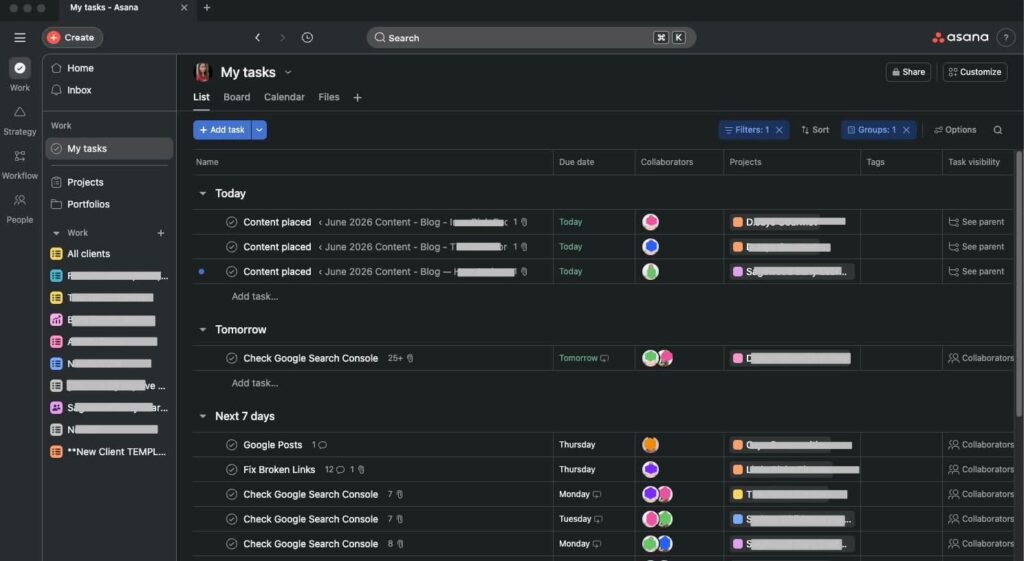
Where that everyday core handles the manual work, Asana’s newer layers aim to remove it.
Asana AI and AI Studio
Asana’s AI is really two things with very different cost implications, and conflating them is the most common mistake buyers make.
- Asana AI — bundled into paid plans: smart status updates, smart fields, a chat assistant, AI summaries, and natural-language automation creation. Included, not billed separately.
- AI Studio — a no-code builder for AI-driven workflows, built on Asana’s data model. Runs on a consumption (credit) model, with extra capacity sold as an add-on.
For most teams the bundled Asana AI is the practical face of the feature and needs no special budgeting. AI Studio is the more powerful and more distinctive half, but its credit model is the catch. Because credits draw down as workflows run, you cannot easily forecast a monthly figure before using it at volume, which makes it genuinely hard to budget and harder still to get approved as an open-ended line item. This is not unique to Asana, since ClickUp also sells its AI as a paid add-on, so a variable AI cost is closer to an industry norm than a quirk. The sensible path is to pilot one contained workflow, measure the draw, and extrapolate. We have not run AI Studio at scale ourselves, so we treat its economics as something to verify against your own usage rather than assert from experience.
Beneath the AI sits the conventional automation most teams will actually lean on.
Automation
Asana’s Rules engine, available from the Starter tier, handles the routine mechanics of coordinated work without code, built on triggers, conditions, and actions.
Rules that quietly remove manual upkeep:
- Move a task to a section when its status changes
- Assign the right owner when a form comes in
- Shift a due date when a dependency slips
The everyday value here is unglamorous and real, and for many teams it removes the need for a separate paid automation tool, a partial offset to Asana’s per-seat cost. The constraint to plan around is volume. The Starter tier caps automation runs per month, and an active team with several busy rules can reach that ceiling, at which point the automations they have come to rely on simply stop firing until the cycle resets or they upgrade. That failure mode is easy to miss until it strikes mid-month, so heavy users should size their needs against the cap rather than discover it the hard way.
Automation keeps work moving; collaboration keeps people aligned around it.
Collaboration
Because discussion in Asana lives on the task it concerns, context stays attached to the work instead of scattering across email threads and chat channels.
Strengths:
- Task comments and assigned comments (a comment that becomes an actionable task)
- @mentions, project messages, and status updates
- Proofing and approvals on higher tiers
- Guest access for outside collaborators
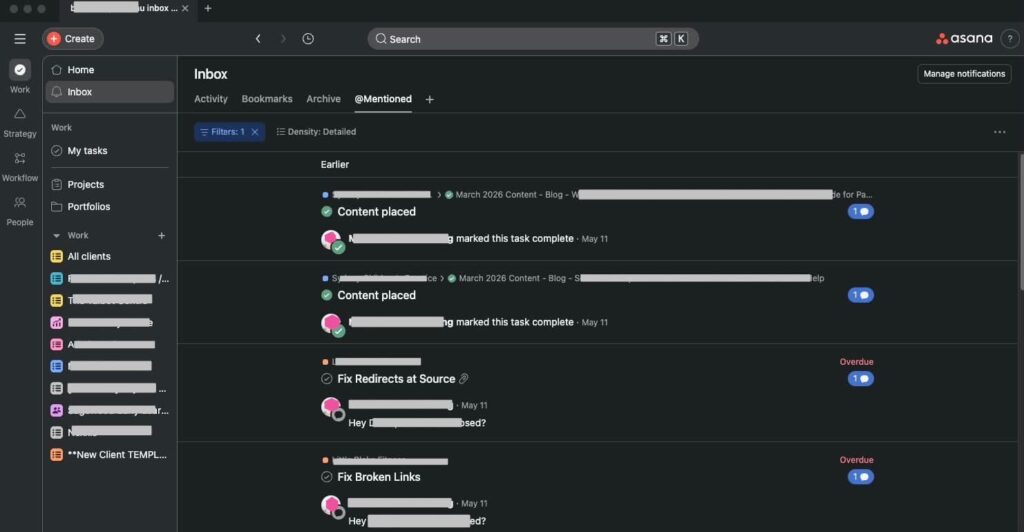
Collaboration is one of Asana’s most positively rated areas in user consensus, especially for cross-functional teams, and that matches the experience of keeping conversation anchored to the work. The recurring frustration, and the one most likely to wear on you over months, is the Inbox. On an active team Asana produces a heavy notification stream, sometimes with what feel like duplicates of the same update, and left unmanaged people begin tuning it out. The real risk there is not annoyance but adoption, since a collaboration system only works if people read it, so tuning notification settings and agreeing on team norms early is less optional than it looks. One honest boundary: Asana is a collaboration layer over work, not a full communication suite, and it does not try to replace a dedicated chat tool.
Reporting and dashboards
Dashboards and reporting let Asana surface progress without manual status-gathering, though this is the part of the core that feels rationed rather than designed.
Dashboards exist on paid plans, but the genuinely useful cross-project reporting most teams want for status meetings is concentrated on Advanced, and even there it is serviceable rather than a replacement for a dedicated analytics tool. For leadership-level reporting across many projects, teams often still export to a spreadsheet or a BI tool, which is worth knowing before you assume Asana will be your single source of truth for metrics.
Ease of Use
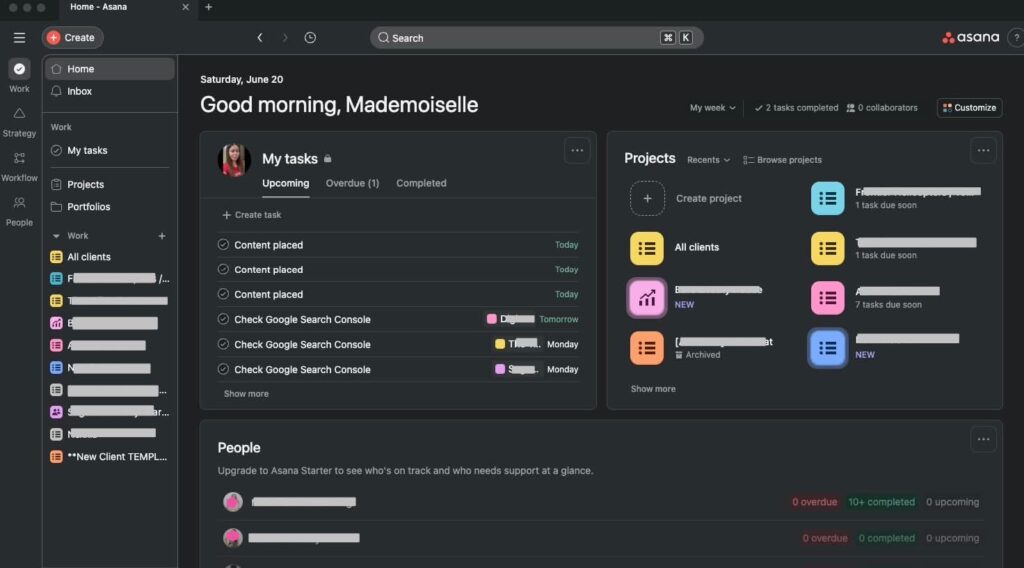
This is the dimension Asana is built to win. A new team member can usually open Asana, find their work in My Tasks, and start completing and commenting on tasks in their first session, with no training. That low barrier is why adoption tends to succeed where it stalls with heavier tools. Its closest match here is monday.com, similarly approachable. The sharper contrast is ClickUp, where the payoff is real but back-loaded behind setup.
The nuance, also well represented in user consensus, is that approachability and a complete absence of a learning curve are not the same thing. The basics are immediately usable, but the more powerful machinery, Rules, custom fields, Portfolios, Goals, and AI workflows, does require deliberate learning, and the interface can feel cluttered as a workspace grows. The fair framing is that Asana’s learning curve is gentle at the entry point and steepens only as you reach for its depth.
Pricing & Value
Asana uses per-user, per-month pricing with a free tier. Figures below reflect annual billing, which is meaningfully cheaper than monthly.
- Personal (Free): $0. New accounts capped at 2 users; legacy accounts before Nov 12, 2025 retain up to 10. Includes unlimited tasks, projects, and messages, plus List, Board, and Calendar views and 200+ integrations. Excludes Timeline, custom fields, Rules, Forms, and reporting.
- Starter: around $10.99/user/month annually ($13.49 monthly). Removes the user cap, adds Timeline, custom fields, Workflow Builder and Rules, Forms, Dashboards, milestones, and bundled Asana AI. Automation runs are capped at this tier.
- Advanced: around $24.99/user/month annually ($30.49 monthly). Adds Goals, unlimited Portfolios, Workload, native time tracking, approvals and proofing, advanced reporting, and Salesforce, Tableau, and Power BI integrations.
- Enterprise / Enterprise+: custom pricing. Adds SSO and SAML, SCIM, data-residency options, advanced admin controls, HIPAA support, audit logs, and additional security tooling.
Two realities matter. The jump from Starter to Advanced is large, more than double per seat, and the features that prompt the upgrade (Goals, Portfolios, Workload) are exactly what a growing team wants. And because Asana charges per seat with no flat-rate option, total cost scales directly with headcount.
Our editorial view: Asana is best judged on return rather than rate. The useful comparison is not Asana’s per-seat figure against a cheaper rival’s, but the value of a tool your whole team genuinely uses against the buried cost of one that gets bought and then abandoned. The spend is justified for the team that will live in Asana daily, more so for one that can retire a separate intake-forms or automation subscription. It is not justified for a team that would use a cheaper, more configurable tool just as fully. The clearest waste is paying for Asana and running it as a glorified task list.
Performance
Performance is, notably, not one of Asana’s major recurring criticisms, which sets it apart from heavier competitors where lag at scale is a frequent complaint. In everyday use Asana is fast and stable, and that snappiness is part of what makes it pleasant over the long term. The honest boundary is scale: behavior under very large workspaces with extremely high task counts and many simultaneous users is outside our direct experience, so we rely on documentation and user consensus there, and that consensus is generally positive without being a guarantee. For small-to-mid teams, performance is unlikely to be a concern.
Integrations
Asana advertises more than 200 integrations, covering Slack, Google Workspace, Microsoft Teams, Zoom, and calendar apps, plus connectivity through Zapier and a public API. Higher tiers add business-intelligence and CRM integrations, notably Salesforce, Tableau, and Power BI on Advanced. For most teams the native catalog plus Zapier and the API will cover requirements comfortably. Two caveats: the BI and CRM connectors larger operations rely on are gated to Advanced, so integration needs can themselves push you up a tier; and while 200-plus is solid, it is a smaller advertised number than some rivals claim, so check the live directory if you depend on a specific, less common tool.
Customer Support
Support availability scales with plan tier. Lower tiers rely more on self-service, higher tiers receive faster, prioritized help, and Enterprise customers can access dedicated support. Asana backs this with an extensive help center, the Asana Academy, and an active community. User consensus is mixed to positive, with a recurring theme that response times on lower tiers can lag, while the self-serve documentation is consistently well regarded. Direct support at large organizations is outside our first-hand experience, so we lean on consensus there. The reasonable read: self-service resolves most everyday questions, and the quality of hands-on support tracks closely with how much you are paying. Treat support as part of the tier decision rather than an afterthought.
Security
Asana maintains a current, well-documented security posture, verified against its Trust Center rather than secondary summaries. It holds SOC 2 Type 2 with a HIPAA assessment covering a period through January 2026, publishes a public SOC 3 report, and maintains ISO 27001 against the 2022 standard, along with ISO 27017, 27018, and 27701. It is GDPR-aligned with a Data Processing Addendum and EU Standard Contractual Clauses, supports CCPA, and uses encryption in transit and at rest, third-party penetration testing, a bug-bounty program, and SSO, SAML, and 2FA, with SCIM and data-residency options on Enterprise.
For most buyers this removes security as a meaningful objection. Three nuances: HIPAA support and the strongest residency controls are tied to Enterprise; Asana’s AI features process work content through AI systems, so teams with strict data-governance needs should review the subprocessor list and AI terms directly; and Asana advises against storing highly sensitive data such as financial-account or social-security numbers in the platform.
Final Verdict
After all of it, Asana resolves into a tool with an unusually clear identity, and our score of Very Good reflects its shape precisely: excellent at its core purpose of making coordinated work legible and getting a whole team to use it, held back mainly by a price that asks you to value that outcome highly enough to pay for it.
Which way that cuts comes down to the question we raised at the start. If getting a whole team to use one tool consistently is the problem you are solving, Asana is worth its premium, and a free or trial run against a real workflow is the lowest-risk way to confirm it. If budget efficiency or deep customization matters more, your money goes further elsewhere.
More than most tools in its category, Asana has a clear answer to what you are actually buying. It is not the longest feature list, and it is not the lowest price. It is clarity, usability, and the quiet confidence that your team will still be using the tool a year from now rather than drifting back to email and spreadsheets. For the buyer who needs exactly that, Asana is worth every cent. For the buyer who needs something else, no amount of polish will change the math.
Alternatives
- ClickUp — Far more configurable with a more generous free plan at a lower per-seat price, in exchange for a steeper learning curve and heavier setup. The natural choice if your objection to Asana is “too expensive” or “not flexible enough.” Read our full ClickUp vs Asana comparison.
- monday.com — Competes closely on visual polish and ease of use, often at a slightly lower entry price. Worth a direct comparison for teams choosing primarily on approachability.
- Trello — Far simpler and Kanban-first, ideal when Asana would be overkill for basic task tracking.
- Notion — Stronger for documents and flexible knowledge management, weaker for execution-focused project tracking. Many teams pair it with a dedicated work tool.
- Wrike — Leans toward resource management and Gantt-heavy enterprise workflows for teams that need that depth.
Frequently Asked Questions About Asana
Is Asana free?
There is a free Personal plan, but for accounts created after November 12, 2025 it is capped at two users. Accounts created before that date keep a legacy version supporting up to ten. The free plan includes unlimited tasks, projects, and messages and the basic views, but not Timeline, custom fields, automation, Forms, or reporting.
How much does Asana cost?
On annual billing, Starter is around $10.99 per user per month and Advanced around $24.99. Monthly billing is higher (roughly $13.49 and $30.49). Enterprise and Enterprise+ are custom-quoted. Asana charges per seat, so cost scales with team size.
Is Asana easy to use?
Yes, by the standards of its category. The interface is clean and most people can be productive quickly without training. The learning curve appears only as you adopt advanced features such as Rules, Portfolios, and Goals.
What is the difference between Asana AI and AI Studio?
Asana AI is a set of features bundled into paid plans, including smart summaries, smart fields, a chat assistant, and natural-language automation creation. AI Studio is a separate no-code builder for AI-driven workflows that runs on a credit-based consumption model, with extra capacity sold as an add-on. The bundled features are included; heavy AI Studio use is a variable cost.
Is Asana secure?
Yes. According to its Trust Center, Asana holds SOC 2 Type 2 with a HIPAA assessment, a public SOC 3 report, and ISO 27001:2022 along with ISO 27017, 27018, and 27701. It is GDPR-aligned with a DPA and Standard Contractual Clauses, uses encryption in transit and at rest, and offers SSO, SAML, and 2FA, with SCIM and data residency on Enterprise.
Asana vs ClickUp, which is better?
They optimize for different things. Asana is faster to adopt and easier to keep a team inside; ClickUp is more configurable and cheaper per seat but takes more setup before it pays off. Pick Asana when uptake is the hard part, ClickUp when flexibility and budget lead the decision.
Is Asana worth the price?
For teams that value polish and broad adoption, and that will use the features their tier unlocks, yes. For budget-sensitive teams or those needing a generous free plan, the per-seat cost and feature-gating make cheaper alternatives more compelling. The deciding factor is usually which tier your essential features require.
About the Author

Mademoiselle Jove, Senior Editor, ZoneVerified
Mademoiselle Jove is the Senior Editor at ZoneVerified. With over eight years of professional experience in SEO, technical SEO, content strategy, and digital marketing, she specializes in evaluating software through the lens of real business workflows. Her experience includes building SEO systems, managing large-scale content operations, conducting technical audits, and working with a wide range of productivity, analytics, marketing, and project management tools. She oversees ZoneVerified’s editorial standards to ensure every review is accurate, transparent, and genuinely useful.
Editorial Independence: ZoneVerified publishes independent reviews based on research, editorial analysis, and genuine hands-on experience where applicable. Our recommendations are never influenced by compensation or commercial relationships.