
Notion is a connected workspace that combines documents, notes, wikis, and databases in one flexible, block-based tool. Every page is built from blocks, text, headings, images, embeds, and databases, and those blocks can be arranged into anything from a simple note to a full team wiki or a project tracker.
Its defining trait is flexibility through structure. Notion does not hand you a fixed app so much as a set of components and a powerful database engine you assemble into the workspace you need. Where an execution-first tool optimizes for tracking tasks, Notion optimizes for organizing knowledge and information, and its project-management features grow out of its database foundation rather than the other way around. That orientation shapes everything about who it suits, which is the question this review keeps returning to.

The workspace to choose when documents, knowledge, and flexible databases matter most, and the wrong one if you need a structured, execution-first project tracker out of the box.
Teams that want one flexible space for docs, wikis, and databases, and enjoy shaping their own system.
You need execution-first task management, strong built-in reporting, or a tool the whole team uses without building it first.
Every ZoneVerified review follows the same evidence-first editorial process. Wherever we have genuine access to a tool, we test it ourselves, then support our findings with official documentation and recurring user consensus, and clearly distinguish first-hand experience from research-based conclusions.
Our ratings are independent and reflect our editorial assessment of each product alone. Commercial relationships never determine how software is reviewed, scored, or recommended, and our conclusions are never influenced by affiliate partnerships. Learn more about our Transparency Policy and Software Review Methodology.
What’s New in 2026
A few shifts shape how Notion evaluates this year, most of them centered on AI and on Notion growing beyond the page. Confirm the specifics below before publishing, as Notion changes packaging often.
- AI moved deeper into the product. Notion’s AI has expanded well past writing help into workspace-wide questions and search across linked tools, and its packaging has shifted toward inclusion in higher plans rather than a pure standalone add-on. Confirm exactly which plans include AI and at what limits.
- The workspace expanded beyond documents. Notion has added companion products around the core app, broadening it from a document tool toward a wider productivity suite. Confirm which are worth naming.
- Databases and reporting kept maturing. Richer database views and charting strengthen reporting, historically one of Notion’s weaker areas.
- Pricing structure. Plan names, prices, and what each tier includes have moved, so confirm current figures and AI inclusion before publishing.
Software Overview
Notion is one of the most flexible workspaces available, and the one to reach for when documents, knowledge, and connected information are the center of how a team works. Its main cost is the inverse of that flexibility: it is not an execution-first project tracker, and realizing its power asks you to design your own system rather than adopt a finished one.
- ✓Exceptionally flexible: build docs, wikis, and databases from the same blocks.
- ✓Powerful database engine with relations, rollups, formulas, and multiple views .
- ✓Clean, well-designed interface that is pleasant to write and read in.
- ✓Among the best tools available for documentation, knowledge bases, and team wikis.
- ✓Generous free plan for individuals and small use.
- ✓Large template ecosystem and an open API .
- −Not execution-first: weaker than dedicated tools for structured task and project tracking.
- −Real learning curve once you move past simple pages into databases, relations, and formulas.
- −Performance can lag on very large or heavily linked databases .
- −Notifications and reminders are weaker than purpose-built project tools Reporting has historically been thinner than dedicated project tools, though it is improving.
- −Notification overload on active teams needs deliberate management
- −Easy to create a disorganized workspace without discipline.
The Trade-Off
Notion’s exchange is flexibility for structure. You get a workspace that can become almost anything, docs, wikis, databases, light project tracking, all in one beautifully designed place, and you give up the guardrails and execution focus that a purpose-built task tool provides.
On one side, almost nothing organizes knowledge and connects information as elegantly. On the other, that same open-endedness means Notion rarely tells you how to work; you design the system, and for task execution specifically it asks more setup and discipline than a tool built only for that.
Our editorial read: this is a trade worth making when documents, knowledge, and flexible information are your center of gravity, and a poor one when structured, execution-first project management is. That single distinction predicts most of whether Notion will feel like the best tool you own or like a beautiful space nobody finished organizing.
Who It’s Best For
Teams whose work centers on documents and knowledge. Wikis, documentation, notes, and connected information are exactly what Notion does best, and many teams adopt it for this alone.
Builders who enjoy shaping their own system. Notion rewards people who want to design a workspace rather than adopt a fixed one, and that enjoyment is close to a prerequisite for getting the most from it.
Small teams and individuals wanting one flexible tool. The generous free plan and breadth make Notion a strong single home for mixed work that would otherwise span several apps.
Teams that want docs and lightweight project tracking together. For heavy documentation alongside light-to-moderate project needs, Notion’s all-in-one nature is a genuine advantage rather than a compromise.
Who Should Look Elsewhere
Teams needing execution-first project management. For structured task tracking, dependencies, workload, and strong built-in reporting, a dedicated project tool will serve better than Notion’s database-derived approach.
Teams that want a tool that works out of the box. Notion’s flexibility is build-it-yourself. If you want to open it and immediately track tasks without designing anything, it asks for setup first.
Large operations dependent on heavy databases. Very large, heavily linked databases can strain performance, so test at your real scale before committing.
Teams needing strong native notifications and deadline management. Reminders and notifications are not Notion’s strength, and a deadline-driven team should not rely on it to chase people.
Every ZoneVerified review runs through the same editorial framework, refined over years of evaluating business software. Wherever possible, our scores are grounded in first-hand testing and supported by official documentation and recurring user consensus, so a score means the same thing from one review to the next.
The framework is structured, but scoring remains an editorial judgment. We combine first-hand experience, official documentation, and recurring user consensus to reach balanced conclusions rather than reducing software to a purely mechanical calculation. Each tool is assessed across six weighted dimensions, with security treated separately as a pass/fail requirement rather than a tradable score.
The largest weight goes to what the software actually does: whether it delivers the capabilities buyers reasonably expect in its category, how deep those capabilities run, and how well they work together as a coherent workflow rather than isolated features. We also reward genuinely distinctive functionality that provides practical value beyond simple feature parity, while noting when expected capabilities are locked behind higher-priced plans instead of being included.
We assess how quickly a new user becomes productive and how the tool feels over sustained daily use, not just on first impression. Strong scores reflect clear interfaces, sensible defaults, useful templates, and a learning curve that stays approachable even when the software offers significant depth.
Value reflects the relationship between what a tool delivers and what it costs, judged against realistic alternatives rather than in isolation. We consider entry pricing, how costs scale as teams or workloads grow, and whether the features that justify upgrading are included on the plan most buyers are likely to need.
We evaluate speed, stability, and reliability under realistic workloads. When performance claims at very large scale fall outside our direct testing, we disclose that limitation and rely on documented evidence alongside recurring user consensus.
We evaluate how well the software connects to a typical technology stack through native integrations, third-party connectors, and an accessible API, while considering whether the integrations most buyers depend on are available without requiring an upgrade.
We assess how easily users can get unstuck through documentation, self-service resources, and direct human support, as well as how the quality and availability of support change across pricing tiers.
Security is a requirement, not a score that can be averaged away. We assess a tool’s published security posture, its certifications where applicable, and its privacy practices, data handling, and access controls, verified against the vendor’s own trust documentation. Judging posture rather than certifications alone lets us fairly evaluate smaller vendors that demonstrate strong security practices without yet holding every enterprise certification. A tool that falls short here is flagged regardless of how it performs elsewhere.
Scores are assigned dimension by dimension before the overall rating is calculated using the fixed weights above. We never adjust individual dimensions simply to reach a preferred final score. Every review also distinguishes clearly between conclusions based on first-hand experience and those supported by official documentation or recurring user consensus.
Read our complete software review methodology.
Core Features
Notion’s power comes from a single idea executed unusually well: everything is a block, and the most important block is the database. Understanding that is the key to understanding what stands out about Notion, because almost every advanced thing it can do is a database wearing a different outfit. The capabilities below build from that foundation, and the database section is the one to read closely.
Blocks, pages, and documents
At its simplest, Notion is a clean, flexible document editor in which every page is assembled from blocks you can rearrange freely.
Key capabilities:
- Rich text, headings, callouts, toggles, code, and media blocks
- Nested pages for effectively unlimited hierarchy
- Synced blocks that mirror the same content across pages
- Wikis and team knowledge bases built from ordinary pages
This is where most people start, and where Notion is immediately easy. Writing in it is pleasant, the design is clean, and turning a page into a wiki or knowledge base takes no special skill. For documentation and knowledge management specifically, Notion is among the best tools available, and that strength alone is why many teams adopt it. The same flexibility that helps here also sets up the learning curve later, because the freedom that makes a simple page effortless makes a complex system something you have to design.
That design challenge, and Notion’s real power, begins with databases.
Databases
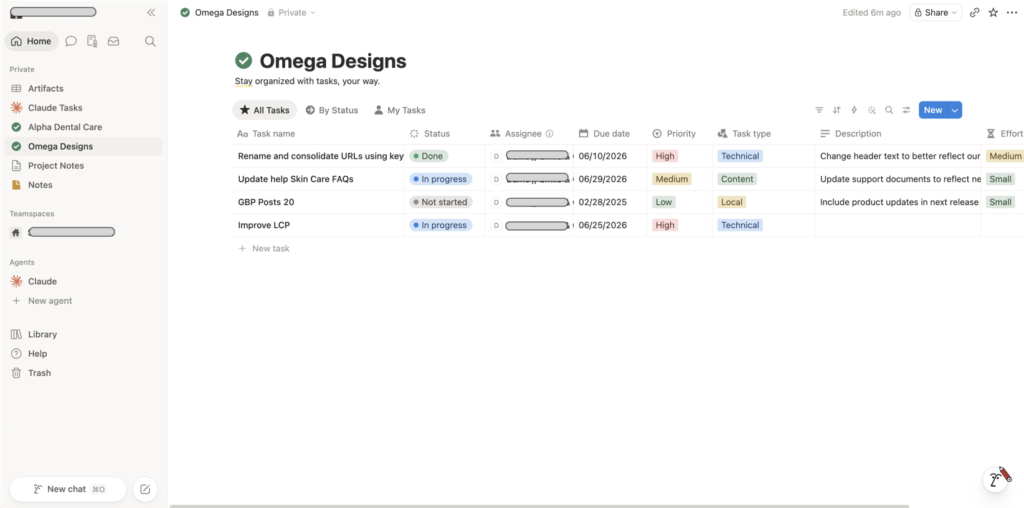
Databases are what separate Notion from a pretty note-taking app, and they are the single feature that defines it. A Notion database is a collection of pages with structured properties that you can view, filter, and connect in many ways.
Key capabilities:
- Properties: text, number, select, date, person, files, and more
- Relations and rollups that link databases and summarize linked data
- Formulas for calculated properties
- Multiple views of the same data: Table, Board, Timeline, Calendar, List, and Gallery
- Linked databases and filtered views that reuse one source in many places
This is the feature worth dwelling on, because it is both Notion’s greatest strength and the root of its learning curve. Relations and rollups let you connect, for example, a projects database to a tasks database and surface each project’s task count or status automatically, which turns static documents into a small, queryable system. Done well this is genuinely powerful: a team can model its own processes without code, and the same data can appear as a board for one person and a calendar for another. The honest caveat is that this power is not free. Relations, rollups, and formulas carry a real conceptual learning curve, and a tangled, poorly designed database is as easy to create as an elegant one. Notion rewards people who enjoy building systems and frustrates those who simply want a tool that already works.
【SCREENSHOT: a Notion database shown as a board, with a relation property linking to another database, client data blurred】 (alt: “Notion database in board view with a relation property linking projects and tasks”)
Layered over docs and databases is an AI assistant that has grown well beyond its original scope.
Notion AI
Notion AI began as writing assistance and has expanded into a workspace-wide layer, with its packaging shifting over time (confirm which plans include it before publishing).
- Writing, summarizing, and editing inside any page
- Questions answered across your own workspace content
- Connectors that extend AI search across linked tools (confirm availability)
- AI-assisted database and content generation
The most useful part is the ability to ask questions across your own content, because a large Notion workspace effectively becomes a knowledge base the AI can search, and that value grows the more you have stored. The buyer-relevant point is packaging: Notion has moved AI from a pure add-on toward inclusion in higher plans, so check exactly which plan includes it and at what limits, because that determines whether AI is a bundled benefit or an extra per-member line item. We treat AI’s day-to-day value as real but its pricing as something to confirm against current plans rather than assume.
Beneath all of it, collaboration is where Notion behaves like a true shared workspace.
Collaboration and sharing
Notion is built for shared workspaces, with real-time editing and granular control over who sees what.
- Real-time collaborative editing
- Comments, mentions, and page-level discussions
- Teamspaces and granular permissions on paid plans
- Public sharing and simple sites published from any page
Collaboration is a genuine strength, especially for documentation-heavy teams where a wiki everyone can read, edit, and comment on is the entire point. Granular permissions and teamspaces let larger organizations keep order as the workspace grows. The flip side, and the consistent note in user consensus, is that Notion’s notifications and reminders are weaker than purpose-built tools, so for deadline-driven execution you cannot rely on it to chase people the way a dedicated project tool does. That is less a flaw than a reflection of what Notion is for.
Ease of Use
Notion is a study in two learning curves. For documents and simple pages it is immediately approachable, arguably more pleasant than any competitor, with a clean interface and a writing experience people genuinely enjoy. The second curve appears the moment you reach for what makes Notion powerful: databases, relations, rollups, and formulas require real conceptual learning, and building a well-structured workspace is a skill in its own right.
User consensus reflects this split: people love Notion for docs and find the database side rewarding but demanding. The fair framing is that Notion is easy to start and hard to master, and unlike a fixed app, much of the “use” is actually “design.” This is why ease of use lands at a solid but not top score. The entry is gentle, but realizing Notion’s potential asks more of the user than a more opinionated tool does.
Pricing & Value
Notion uses per-user, per-month pricing with a free tier. Figures below reflect annual billing and should be confirmed before publishing, as plan structure has shifted.
- Free: $0. Generous for individuals and small personal use, with collaboration limits that paid plans remove.
- Plus: around $10/user/month annually. Aimed at small teams, removing core block and collaboration limits.
- Business: around $15 to $20/user/month annually. Adds advanced features, SAML SSO, private teamspaces, and, on current plans, Notion AI inclusion (confirm).
- Enterprise: custom pricing, adding advanced security, admin controls, and audit logging.
- Notion AI: historically a per-member add-on on lower plans, increasingly bundled higher up (confirm current model).
Value is solid. The free plan is genuinely useful for individuals and very small use, and paid pricing is competitive for what is effectively a documents, wiki, and database tool in one. The key variable is AI: because Notion has moved AI between add-on and bundled, the effective cost depends on which plan you need and whether AI is included at that tier, so price the plan you actually need rather than the entry rate. For documentation-heavy teams that would otherwise pay for a separate wiki and notes tool, consolidating into Notion is where the value case is strongest.
Performance
Performance is generally fine for everyday documents and modest databases, but it is the area most likely to strain as a workspace grows. User consensus reports slowdowns on very large or heavily linked databases and on pages packed with embedded views, and load times on big workspaces have historically drawn criticism, though Notion has worked to improve them.
An important boundary: large-scale database performance is outside our direct testing, so we weigh it as consensus rather than a first-hand finding, and our own use on moderate workspaces has been responsive. The practical read: small-to-mid use is comfortable, but a team planning very large, relation-heavy databases should test responsiveness during a trial. This keeps performance at a moderate score, a real concern in consensus but unconfirmed by us at scale.
Integrations
Notion offers a public API, a growing set of native integrations, and connectivity to many tools through Zapier and Make, along with newer AI connectors that let its workspace questions search across linked apps (confirm availability). The native integration catalog is smaller than the largest all-in-one rivals advertise, so Notion leans more on its API and third-party automation than on a vast built-in directory. For most documentation and knowledge workflows this is sufficient; teams that need deep, native two-way syncs with many specific tools should check each one rather than assume parity with execution-first platforms.
Customer Support
Support is primarily self-service, built on an extensive help center, a large template gallery, and an active community, with direct support availability scaling on paid and enterprise plans. User consensus is generally positive on documentation and community resources and more mixed on the depth of direct response at lower tiers. The self-serve material and community are strong enough to resolve most everyday questions, and as with peers, faster human help tracks with the plan you are on.
Security
Notion maintains a documented security posture, which should be verified against its official security and trust pages rather than secondary summaries. It holds recognized certifications including SOC 2 Type 2 and ISO 27001, is GDPR-aligned, and uses encryption in transit and at rest, with SAML SSO and SCIM provisioning on higher tiers and audit logging on Enterprise. HIPAA support, where offered, is tied to appropriate plans (confirm).
For most buyers this clears the gate. Three nuances: SSO and the strongest admin and audit controls are tied to Business and Enterprise; Notion’s AI processes workspace content, so teams with strict data-governance requirements should review the AI and subprocessor terms directly; and the standard caution applies against storing highly sensitive personal data in any work platform regardless of certification.
Notion Specs
Final Verdict
After all of it, Notion resolves into a tool with a clear center of gravity, and our score of Very Good reflects it: outstanding as a flexible workspace for documents, knowledge, and databases, held back as a project tracker by the execution focus, notifications, and out-of-the-box structure it deliberately does not prioritize.
The decisive question is what your work is actually built around. If documents, wikis, and connected information are the core, and you enjoy shaping your own system, Notion is among the best tools in existence and consolidates several others into one elegant place. If you need structured, execution-first project management that works the moment you open it, the flexibility that is Notion’s strength becomes friction, and a dedicated tool will serve you better.
What you are buying with Notion is not a finished app. It is a set of exceptionally good building blocks and a database engine powerful enough to model your own way of working, provided you are willing to do the building. For the team that wants exactly that, little else compares. For the team that wants structure handed to them, Notion asks for more design than they may want to give.
Alternatives
Each alternative below should carry a thumbnail and a link to either the vendor or the ZoneVerified review when it exists.
- Asana — Execution-first and more opinionated, built for structured task tracking rather than documentation. The choice when project execution, not knowledge management, is the center of the work.
- ClickUp — A broader all-in-one with stronger native project management and reporting, at the cost of a steeper learning curve. Overlaps Notion’s all-in-one ambition from the execution side.
- Confluence — Closer to Notion for team wikis and documentation, and a natural fit for organizations already invested in Atlassian.
- Coda — Notion’s closest philosophical rival, blending documents and databases, with stronger built-in automation and packs.
- Obsidian — Built for individual, local-first knowledge management and networked notes rather than team collaboration.
Frequently Asked Questions
Is Notion free?
Yes. The free plan is generous for individuals, with collaboration limits that paid plans remove for teams. Confirm the current limits before relying on them.
How much does Notion cost?
On annual billing, the Plus plan is around $10 per user per month and Business around $15 to $20, with Enterprise custom-quoted. Notion AI inclusion varies by plan, so confirm whether it is bundled at the tier you need or charged as a per-member add-on.
About the Author

Mademoiselle Jove, Senior Editor, ZoneVerified
Mademoiselle Jove is the Senior Editor at ZoneVerified. With over eight years of professional experience in SEO, technical SEO, content strategy, and digital marketing, she specializes in evaluating software through the lens of real business workflows. Her experience includes building SEO systems, managing large-scale content operations, conducting technical audits, and working with a wide range of productivity, analytics, marketing, and project management tools. She oversees ZoneVerified’s editorial standards to ensure every review is accurate, transparent, and genuinely useful.
Editorial Independence: ZoneVerified publishes independent reviews based on research, editorial analysis, and genuine hands-on experience where applicable. Our recommendations are never influenced by compensation or commercial relationships.