
Most SEO work is small, quick checks. Is this page indexable? What is the title tag? How much search volume does this term get? Who else is ranking?
None of those need a full software platform. They need an answer in about two seconds, on the page you are already looking at. That is what browser extensions do well, and it is why they have quietly become part of the daily toolkit rather than a nice extra.
The best SEO extensions for Chrome pull data into the tab you are already in. You run a search and see volume next to every suggested keyword. You land on a competitor’s article and see their heading structure, schema, and canonical tag without opening view-source. You click a link and watch the redirect chain resolve. Each saves maybe twenty seconds. Do it four hundred times a month and the maths gets interesting.
There is a limit worth being honest about. Extensions are not a replacement for full SEO software. They pull small slices of data on demand. They cannot crawl a site, track rankings over months, or generate a client report. If you are choosing between a $10 extension and a $129 platform to save money, you are comparing two different categories of thing.
The other thing to understand early is the free versus premium split. Some of these are completely free. Some are free shells displaying data from a paid subscription you already have. Some are free to install but meter the useful data behind credits. We have separated those for every tool, because “free” gets used very loosely here.
We cover the software category in our best SEO tools roundup, and the wider SEO tools hub collects our reviews. This guide is only about what runs inside your browser.
At a Glance
| Need | Recommendation |
|---|---|
| Best Overall | Ahrefs SEO Toolbar |
| Best Free Extension | Detailed SEO Extension |
| Best Keyword Research | Keywords Everywhere |
| Best Technical SEO | Detailed SEO Extension |
| Best On-Page Analysis | SEOquake |
| Best Traffic Intelligence | Similarweb |
| Best for Beginners | Keyword Surfer |
| Best Upgrade Path | Ahrefs SEO Toolbar |
There is no single winner here and we are not going to invent one. The right extension depends on what kind of SEO work fills your week. A technical SEO auditing JavaScript rendering needs something very different from a blogger checking whether a keyword is worth writing about.
How We Selected These Extensions
Our full methodology sits in how we review. Here is the short version for this category.
We are judging the extension itself, not the company behind it. Ahrefs being an excellent platform does not automatically make its toolbar excellent, and a free extension from a small developer can easily beat one from a large vendor.
The factors we weighted:
Ease of use. An extension needing three clicks to show a title tag has already lost.
Browser performance. Memory footprint, whether scripts get injected into every page, and whether page loads slowed.
Practical usefulness. Does this solve a problem that comes up in daily work, or is it a feature list looking for a use case?
Data quality. Where the data comes from, how fresh it is, and how honest the tool is about its own margin of error.
Free functionality. What you can actually do without paying. We tested the free experience first in every case.
Upgrade value. Does the paid tier unlock something meaningful or just remove an artificial limit?
Workflow efficiency. How well it works alongside the other extensions you are likely to run.
We excluded several popular options. Some had not been updated for Chrome’s Manifest V3 requirements. Some requested permissions well beyond what their features justified. Some were free front ends for platforms that gate everything useful behind a subscription, which makes them advertising rather than tools.
Do You Really Need SEO Browser Extensions?
Not everyone does. If you publish one post a month and check rankings occasionally, Search Console plus one free extension covers you.
If SEO fills a meaningful part of your week, the case is straightforward.
The benefits:
Faster research. Competitor analysis stops being a project and becomes something you do while reading.
One-click insights. Checking whether a page is noindexed or a canonical points somewhere odd takes one click instead of a trip to a separate tool.
Better productivity. Small time savings compound. This is the main argument, and it is a good one.
Less tab switching. Context switching has a real cost.
The limitations:
Limited datasets. Small amounts of data queried on demand. No full crawls, no historical databases.
Browser-only functionality. No scheduling, no monitoring, no alert when something breaks at 3am.
Some require paid subscriptions. Several of the best extensions are display layers for paid platforms. Without the subscription you get a fraction of what the marketing screenshots show.
They cannot replace full SEO software. Site audits, rank tracking, keyword databases, and reporting all live in platforms.
One more practical point: extensions compete for browser resources. Installing all seven of these will slow Chrome noticeably. Most professionals run three or four and disable the rest.
Quick Comparison Table
| Extension | Best For | Free Version | Chrome Performance | Overall Rating |
|---|---|---|---|---|
| Detailed SEO Extension | Technical and on-page audits | Fully free, no account | Very light | 4.8 / 5 |
| Ahrefs SEO Toolbar | All-round SEO analysis | Substantial free toolkit | Light | 4.7 / 5 |
| Keywords Everywhere | Keyword and volume research | Limited, credits needed for volume | Moderate | 4.5 / 5 |
| Keyword Surfer | Beginner keyword research | Fully free | Light | 4.3 / 5 |
| SEOquake | On-page and SERP analysis | Fully free, deeper with Semrush | Moderate to heavy | 4.0 / 5 |
| Similarweb | Traffic and competitor intelligence | Free, limited lookups | Moderate | 4.0 / 5 |
| MozBar | Domain Authority checks | Free account needed for DA and PA | Moderate | 3.8 / 5 |
Best SEO Extensions for Chrome
Detailed SEO Extension
Free, and the one we would install first on a fresh machine.
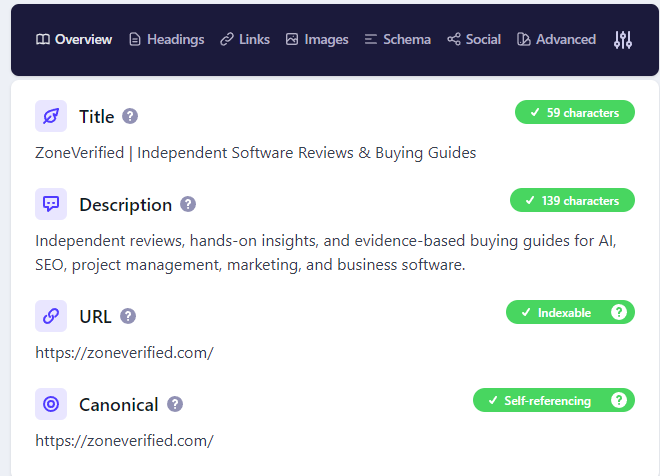
Detailed does one thing: it shows everything a search engine sees on the page you are looking at, in a single clean panel.
Best For
Technical SEO checks, on-page audits, and competitor teardowns.
Key Features
- Full metadata panel: title, description, canonical, and robots directives including X-Robots HTTP headers
- Heading structure shown with indentation and scaled font sizes
- Schema markup viewer, so you can read structured data without a separate testing tool
- Hreflang reference list with status codes for multi-locale projects
- Open Graph and social tag inspection
- Quick links that open the current page in Ahrefs, Moz, Majestic, Similarweb, and the Wayback Machine
- ✓ It is genuinely free. No account, no credits, no upsell prompts, and no feature gates.
- ✓ The heading view is the standout. Seeing H1 through H6 indented and scaled makes structural problems instantly visible.
- ✓ It is fast and lightweight, with far less memory overhead than extensions that inject scripts into every page.
- ✓ No tracking. Unusual in a category where many browser extensions request broad permissions.
- − No off-page data. It cannot show backlinks, authority metrics, traffic estimates, or other competitive signals.
- − No keyword research features, including search volume, keyword difficulty, or ranking data.
- − Single-page only. It does not crawl websites, so site-wide issues must be checked one page at a time.
Free Version Overview
There is no paid version. Everything above is what you get, and Ahrefs has said existing features stay free. If premium capabilities arrive later, the stated intention is that they sit alongside the free tools rather than replace them.
Who Should Use It
Everyone. This is the closest thing to a universal recommendation here. Technical SEOs will use it hourly, writers will use it to check competitor structure, and beginners will learn a lot just from reading what it surfaces.
When It’s Time to Upgrade
There is nothing to upgrade to. When you need to crawl a whole site and find patterns across thousands of URLs, that is a desktop crawler’s job. Our Screaming Frog SEO Spider review covers what most teams move to.
Ahrefs SEO Toolbar
The most capable all-rounder, and unusually generous with what it gives away.
Most platform extensions are thin display layers showing almost nothing without a subscription. This one is not. A large chunk works with no Ahrefs account at all.
Best For
On-page analysis, link inspection, and technical checks in one place, plus anyone with an existing Ahrefs subscription.
Key Features
- On-page report covering titles, meta descriptions, headers, canonicals, and indexation directives
- Redirect tracer showing the full chain with status codes
- Broken link checker and a link highlighter that separates followed, nofollowed, internal, and external links
- HTTP header inspection and a user-agent switcher for viewing pages as Googlebot
- Country and language switching for SERPs, which removes the need for a VPN
- CSV export for link data
- For subscribers: Domain Rating, URL Rating, referring domains, keyword counts, and traffic estimates in search results
- ✓ The free feature set is unusually deep, including redirect tracing, header inspection, user-agent switching, and SERP country switching.
- ✓ SERP country switching is a major time saver for international SEO, removing the need for a VPN in many cases.
- ✓ The link highlighter speeds up audits and outreach by visually separating internal, external, and nofollow links.
- ✓ It is actively maintained, with regular updates and reliable compatibility with current Chrome releases.
- − The headline SEO metrics require a paid subscription. Domain Rating, traffic estimates, and keyword data are unavailable on the free toolbar.
- − Ahrefs is one of the more expensive SEO platforms, and free Webmaster Tools only cover sites you own and verify.
- − Viewing metrics directly in search results can consume credits on some plans faster than many users expect.
Free Version Overview
Without an account you get the on-page report, redirect tracer, broken link checker, link highlighter, HTTP headers, user-agent switcher, country changer, and CSV export. That is a properly useful free tool, not a demo. What you do not get is any Ahrefs data.
Who Should Use It
Existing Ahrefs subscribers, since it extends a subscription they already pay for. Everyone else should install it for the free technical tools and ignore the greyed-out metrics.
When It’s Time to Upgrade
When you need competitor backlink data and keyword research at scale rather than page-level checks. The Ahrefs review covers where the platform justifies its price. If cost is the sticking point, our roundup of Ahrefs alternatives covers cheaper options, and Ahrefs vs Semrush is the usual next question.
Keywords Everywhere
The keyword research extension most people mean when they say “keyword research extension.”
It puts search volume, CPC, and competition data into Google results, and into YouTube, Amazon, Bing, eBay, Etsy, Google Trends, Search Console, and a dozen other places.
Best For
Keyword research done in the flow of ordinary searching rather than in a dedicated session.
Key Features
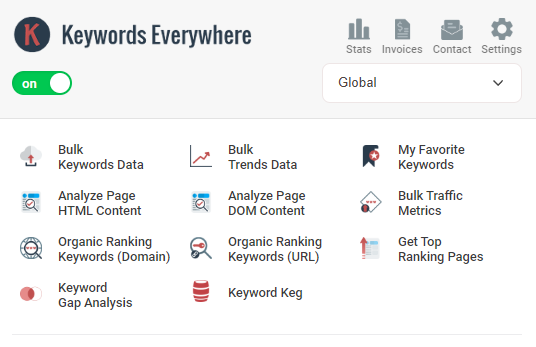
- Monthly volume, CPC, and competition inline in search results
- Twelve-month trend charts and historical volume data
- Related keywords, People Also Search For, and long-tail widgets
- Bulk keyword lookups and keyword gap analysis
- Website research showing keywords a domain ranks for and its backlinks
- YouTube insights, tags, and ranking metrics
- Social engagement metrics for Instagram, Pinterest, and X
- Prompt template library for ChatGPT, Claude, Gemini, and DeepSeek, plus a REST API and MCP server
- ✓ SERP export is genuinely useful, letting you download a full search results page with SEO metrics attached.
- ✓ Keyword density reports remain valuable for spotting over-optimized pages, even if density percentages themselves are no longer an SEO target.
- ✓ The core toolkit is completely free, including on-page audits, keyword density analysis, link reports, and the SERP overlay.
- ✓ Highly customizable, allowing you to remove unnecessary metrics and keep only the data you actually use.
- − The interface feels dated and cluttered, making it less approachable than newer SEO extensions.
- − It requests broad browser permissions and uses more system resources than most competing extensions.
- − The SERP overlay occasionally breaks after Chrome updates and may require reinstalling the extension.
- − Much of its data comes from third-party sources rather than its own index, so metrics can become outdated when external APIs change.
Free Version Overview
This is where careful reading matters. Keywords Everywhere is free to install, but the free tier does not include search volume, CPC, competition, or trend data. Free means the LLM prompt library, the Instagram hashtag generator and engagement metrics, Pinterest insights, and X engagement metrics.
For the keyword data most people install it for, you need a free API key plus a paid plan with credits. Plans are annual: Bronze at $84 per year for 100,000 credits and one seat, Silver at $168 for 400,000 credits and three seats, Gold at $480 for 2,000,000 credits and ten seats, and Platinum at $1,440 for 8,000,000 credits and twenty seats. Every plan has the same features. The differences are credits, seats, per-website research caps, and bundled extras. Silver and above include SEO Minion, Gold and above add Keyword Keg.
Who Should Use It
Content marketers, bloggers, affiliate marketers, and ecommerce sellers doing constant keyword research. Also anyone researching on YouTube or Amazon, where the alternatives are weak.
When It’s Time to Upgrade
Bronze is enough for solo work at moderate volume. Move up when you actually run out mid-year rather than as a precaution, since credits expire anyway.
The bigger question is different. When you need keyword difficulty you can trust, SERP feature analysis, rank tracking, and content gap analysis across whole domains, you have outgrown the extension category. A fuller breakdown of the credit system and our testing sits in our Keywords Everywhere review, and the wider category is covered in our best keyword research tools guide.
Keyword Surfer
The free alternative to Keywords Everywhere, and the better starting point for most beginners.
Made by Surfer, it does roughly what Keywords Everywhere does for Google results, at no cost.
Best For
Beginners learning keyword research, and anyone wanting basic volume data without a subscription or credit balance.
Key Features
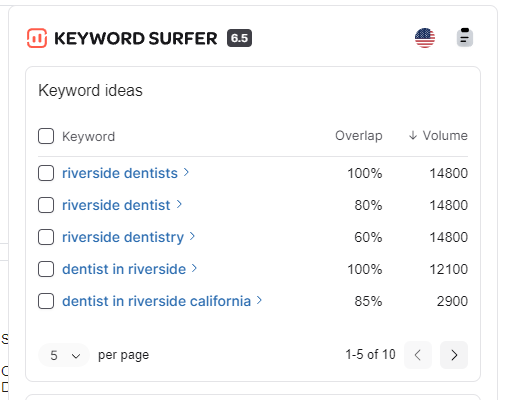
- Monthly search volume displayed under the search bar
- Related keyword suggestions with volume and similarity scoring
- Estimated monthly traffic for each result in the SERP
- Word count for each ranking page, useful for gauging expected content depth
- Content ideas pulled from the current SERP
- International volume data for a range of countries
- ✓ Completely free with no account, credit system, or usage limits, making it one of the easiest keyword tools to recommend.
- ✓ Word count in the search results provides instant context on the level of content needed to compete.
- ✓ Lightweight and fast, with noticeably lower browser resource usage than many paid SEO extensions.
- ✓ Almost no learning curve. Most users can start using it effectively within minutes.
- − Google only. It does not support keyword research for YouTube, Amazon, Etsy, or other marketplaces.
- − Search volume estimates become less reliable for low-volume and long-tail keywords.
- − No CPC or commercial intent metrics, which limits its usefulness for affiliate marketing and ecommerce research.
- − Primarily serves as an entry point to Surfer’s paid content optimization platform rather than a standalone SEO suite.
Free Version Overview
Everything described is free and there is no paid tier of the extension. Surfer’s paid platform is a separate product focused on content optimisation, not an upgraded version of the extension.
Who Should Use It
Beginners, bloggers on a budget, and anyone wanting to try keyword research before paying for it. Also a sensible companion for people who already pay for a platform and want quick volume checks without burning platform credits.
Compared with Keywords Everywhere
Keyword Surfer is free and covers Google. Keywords Everywhere costs money and covers fifteen or more platforms with deeper related-keyword data, historical trends, and bulk lookups.
If you only research on Google and you are price sensitive, start with Keyword Surfer. If you work on YouTube or Amazon, or need CPC data and bulk analysis, Keywords Everywhere does the job. Plenty of people run both, since Keyword Surfer costs nothing and covers you when credits run out.
When It’s Time to Upgrade
When rough estimates stop being good enough for the decisions you are making. If you are choosing between two keywords and the gap is a few hundred searches, you need a real keyword database behind you.
SEOquake
The veteran. Still free, still useful, and still showing its age in places.
SEOquake has been around since 2006 and is now a Semrush product. It layers metrics over search results and provides on-page reports for any page you visit.
Best For
Quick on-page diagnostics and SERP-level competitive scanning, particularly for Semrush users.
Key Features
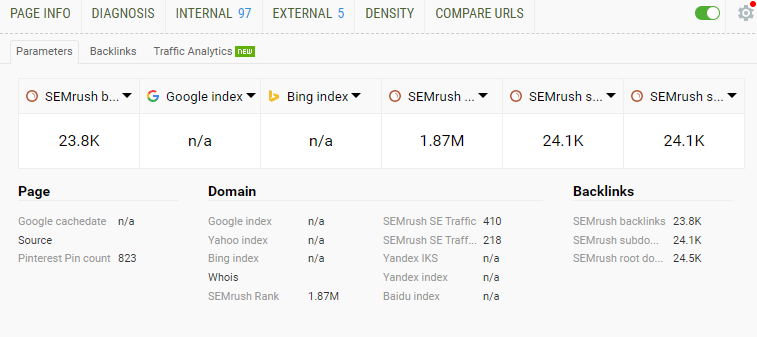
- Configurable SEO dashboard for any page
- SERP overlay showing metrics under each result
- SEO audit report flagging common on-page issues, including mobile compatibility
- Keyword density report
- Internal and external link analysis
- Domain comparison across multiple sites, and CSV export from SERPs and reports
- Semrush rank, traffic estimates, and backlink counts for connected accounts
- ✓ SERP export is genuinely useful, letting you download a full search results page with SEO metrics attached.
- ✓ Keyword density reports remain valuable for spotting over-optimized pages, even if density percentages themselves are no longer an SEO target.
- ✓ The core toolkit is completely free, including on-page audits, keyword density analysis, link reports, and the SERP overlay.
- ✓ Highly customizable, allowing you to remove unnecessary metrics and keep only the data you actually use.
- − The interface feels dated and cluttered, making it less approachable than newer SEO extensions.
- − It requests broad browser permissions and uses more system resources than most competing extensions.
- − The SERP overlay occasionally breaks after Chrome updates and may require reinstalling the extension.
- − Much of its data comes from third-party sources rather than its own index, so metrics can become outdated when external APIs change.
Free Version Overview
The core extension is free with no account. Connecting a Semrush account adds Semrush rank, traffic estimates, and backlink data to the overlay. Semrush plans run at $139.95 per month for Pro, $249.95 for Guru, and $499.95 for Business, with roughly 17 percent off annual billing.
Who Should Use It
Existing Semrush subscribers first, since the account connection is what makes it shine. After that, SEOs who want a free on-page audit and density tool and do not mind an interface designed a decade ago.
When It’s Time to Upgrade
When SERP snapshots stop answering your questions and you need position tracking, full site audits, and competitor keyword databases. Our Semrush review covers the platform, and Semrush vs SE Ranking is worth reading if budget is a constraint.
Similarweb
The traffic estimation tool, useful as long as you understand what its numbers are and are not.
Best For
Competitor research, prospecting, and market sizing. Anywhere the question is “how big is this site, roughly.”
Key Features
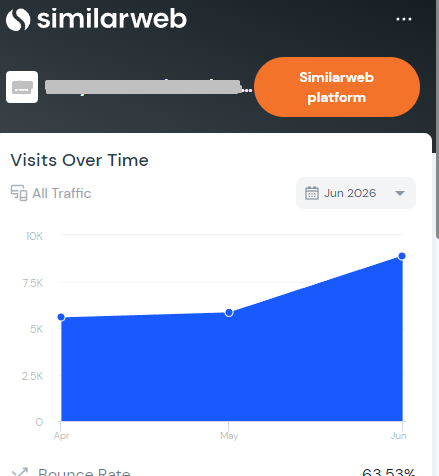
- Estimated monthly visits for the current domain
- Global, country, and category ranking
- Traffic source breakdown across direct, search, referral, social, email, and paid
- Engagement metrics including visit duration, pages per visit, and bounce rate
- Audience geography and category comparison
- ✓ Answers a question most SEO tools cannot by estimating total website traffic across all channels, not just organic search.
- ✓ Traffic source breakdown is genuinely valuable, showing whether competitors rely on search, paid ads, social media, referrals, or direct traffic.
- ✓ Basic lookups require no account, and the browser panel is quick to read without interrupting your workflow.
- − Accuracy varies widely with site size. Estimates are generally more reliable for large websites than for smaller ones.
- − Free usage is limited, with restrictions on the number of results returned and the amount of historical data available.
- − The full platform is expensive, with entry-level plans starting around $125 to $149 per month before enterprise pricing.
- − Traffic figures are modeled estimates rather than analytics data, making them useful for trends but not as definitive measurements.
Free Version Overview
The extension is free and gives basic traffic rank, visit estimates, and traffic sources while browsing. The free web tool is capped at a small number of results per metric with limited history. A seven-day platform trial exists but requires a credit card and caps daily actions.
Who Should Use It
Agencies pitching new clients, affiliate marketers sizing up a niche, and content strategists working out where a competitor’s audience actually comes from.
When It’s Time to Upgrade
Only when traffic intelligence is central to your job rather than occasional context. For most SEOs the free extension is enough. If you are choosing between a Similarweb subscription and an SEO platform, the platform is almost always the better first purchase.
MozBar
The extension that popularised Domain Authority, now working harder to stay relevant.
MozBar was rebuilt as V5 with a faster framework, 48-hour data caching to reduce API calls, and a toolbar you can dock to any edge of the screen.
Best For
Quick Domain Authority and Page Authority checks, especially during link prospecting.
Key Features
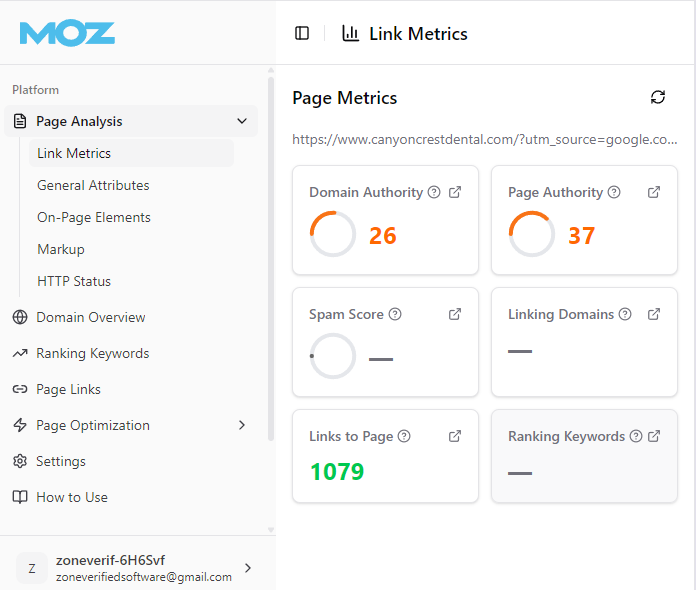
- Domain Authority and Page Authority in SERPs and on-page
- Link metrics including linking root domains
- SERP overlay with metrics under every result
- On-page element analysis and link highlighting by type
- Search customisation by engine, country, region, or city
- Spam Score, Page Optimization scoring, and keyword ranking data for subscribers
- ✓ Domain Authority remains the industry’s common shorthand, making it useful for outreach, link building, and client reporting.
- ✓ The rebuilt Version 5 extension is noticeably faster, with improved caching that reduces unnecessary queries.
- ✓ Location-specific SERP checks are genuinely useful for local SEO and regional ranking analysis.
- ✓ A free Moz account unlocks Domain Authority and Page Authority without requiring a paid subscription.
- − Domain Authority is Moz’s own comparative metric, not a Google ranking factor, so it should never be treated as a direct measure of ranking potential.
- − The headline metrics require signing in. Without a free account, the extension only shows basic on-page information.
- − Moz’s backlink index is smaller than Ahrefs’ or Semrush’s, making its authority metrics less dependable for newer and smaller websites.
- − The extension is heavier than lightweight alternatives because the search overlay runs continuously on supported pages.
Free Version Overview
Three tiers of access. Guest mode, with no account, gives on-page elements, general attributes, and internal link details. A free Moz Community account adds Domain Authority and Page Authority plus limited Keyword Explorer and Link Explorer queries. A Moz Pro subscription unlocks Spam Score, Page Optimization, domain analysis, and keyword ranking queries.
Moz Pro starts around $49 per month for Starter, or roughly $39 per month on annual billing, which makes it the cheapest entry point among the major platforms.
Who Should Use It
Link builders qualifying prospects quickly, agencies whose clients already speak in DA terms, and beginners who find Moz’s metrics easier to grasp than raw backlink counts.
When It’s Time to Upgrade
If you need Spam Score for link audits or Page Optimization scoring and you are not already paying for another platform. Our Moz Pro review covers whether the full platform holds up in 2026. For most people the free Community account is the right stopping point, and any budget is better spent on a platform with a bigger link index.
Also Worth Installing
Redirect Path by Ayima does one job perfectly. It shows the complete redirect chain for any URL, flags 301, 302, 404, and 500 status codes, catches client-side meta and JavaScript redirects, and displays HTTP headers and server IP. Free, actively maintained, updated for Manifest V3, and everything processes locally. If you migrate sites or audit redirects, install it.
Wappalyzer identifies the technology stack behind any site: CMS, ecommerce platform, analytics, frameworks, hosting. Useful for competitive research and for understanding a site before you audit it. The free version covers technology detection, with paid tiers adding company and contact data.
Lighthouse is already built into Chrome DevTools, so there is nothing to install. Press F12, open the Lighthouse tab, and run an audit for performance, accessibility, best practices, and SEO. It is the most reliable free Core Web Vitals diagnostic available.
Which SEO Extension Should You Install?
Almost nobody uses just one. The useful question is which combination fits your work.
Beginner
Keyword Surfer + Detailed SEO Extension + SEOquake
All free, no accounts, no credits. Keyword Surfer teaches you to think about volume and content depth. Detailed shows you what a well-structured page looks like. SEOquake gives you audits and density reports when you want to dig deeper. This stack costs nothing and will carry you through your first year.
Content Creator
Keywords Everywhere + Keyword Surfer + Similarweb
Keywords Everywhere for research across Google, YouTube, and marketplaces. Keyword Surfer as a free backstop when credits run low, plus its word count data. Similarweb for understanding where competitors actually get their audience.
Technical SEO
Detailed SEO Extension + Ahrefs SEO Toolbar + Redirect Path
Detailed for metadata, schema, hreflang, and heading structure. The Ahrefs toolbar for user-agent switching, HTTP headers, and broken links. Redirect Path for chains and status codes. We swapped SEOquake out here in favour of Redirect Path, which is lighter and better at the specific job. Add SEOquake back if you want its audit report.
Agency
Ahrefs SEO Toolbar + Detailed SEO Extension + Keywords Everywhere + Similarweb
Covers audits, on-page checks, keyword research, and competitor traffic intelligence. Enough for pitching, prospecting, and delivery. Note that the toolbar and Detailed now share an owner, so treat them as one vendor when you think about tool dependency.
A practical warning for all four stacks: keep active extensions to around five or six. Beyond that Chrome slows noticeably. Disable what you are not using rather than uninstalling, so it is ready when you need it.
SEO Extensions vs Full SEO Platforms
This comes up constantly, usually phrased as “can I just use free extensions instead of paying for Ahrefs.” The answer is no, but the reasoning matters more than the verdict.
Data depth. Extensions query small amounts of data for the page in front of you. Platforms maintain indexes of billions of keywords and trillions of links and let you query all of it. That is a difference in kind, not degree.
Keyword databases. An extension shows volume for keywords you happen to search. A platform lets you pull every keyword a competitor ranks for, filter by difficulty and intent, and find gaps. You cannot get there one search at a time.
Competitor analysis. Extensions snapshot one page or domain. Platforms compare portfolios of competitors and show what changed last month.
Site audits. No extension crawls a site. Finding that 340 pages share duplicate title tags needs a crawler.
Reporting and collaboration. Client reports, white-labelling, scheduled exports, and shared workspaces live in platforms. Extensions are single-user, single-device tools.
Historical data. Extensions show you now. Platforms show the last three years, which is how you tell a seasonal dip from an algorithmic hit.
Workflow efficiency. The one area extensions win. For quick, frequent checks, opening a platform is slower than clicking an icon. That is why professionals who pay for platforms still run extensions all day.
Platforms answer strategic questions and extensions answer tactical ones. Our best SEO tools roundup covers the platform side, and if pricing looks steep, the SE Ranking review and Serpstat review look at more affordable options covering much of the same ground.
Final Recommendations
Best Overall: Ahrefs SEO Toolbar. The deepest free feature set of any platform extension, and considerably more powerful if you already pay for Ahrefs. Redirect tracing, user-agent switching, and SERP country changing alone justify the install.
Best Free Option: Detailed SEO Extension. No account, no upsell, no tracking, and the fastest way to read any page’s technical setup. Worth knowing it is now owned by Ahrefs, though the free commitment has been stated publicly.
Best Keyword Research: Keywords Everywhere. Nothing else covers Google, YouTube, Amazon, and marketplaces with volume, CPC, and trend data at this price. Go in understanding the credit system, because that is where people get caught out.
Best Technical SEO: Detailed SEO Extension. Second mention, and deserved. For metadata, schema, canonicals, hreflang, and robots directives it is faster and clearer than anything else here.
Best Traffic Intelligence: Similarweb. The only practical way to see total traffic and channel breakdown for a competitor from your browser. Hold the numbers loosely, especially for smaller sites.
Best for Beginners: Keyword Surfer. Free, no account, no credits, and it builds good instincts about search volume and content depth with no setup.
Best Upgrade Path: Ahrefs SEO Toolbar. If you eventually pay for a platform, this is the extension that gets dramatically better rather than staying the same.
If you want one starting stack and no further thinking: install Detailed SEO Extension and Keyword Surfer today, both free, and add the Ahrefs SEO Toolbar when you want the technical tools. That covers most SEO work for most people, at no cost.
Frequently Asked Questions
What is the best SEO extension for Chrome?
There is no single best one, but the Ahrefs SEO Toolbar comes closest to an all-rounder because so much of it works without a subscription. For purely free options, Detailed SEO Extension is the strongest.
Which SEO Chrome extension is completely free?
Detailed SEO Extension, Keyword Surfer, SEOquake, and Redirect Path are free with no account and no metering. The Ahrefs SEO Toolbar has a large free feature set but reserves its metrics for subscribers. MozBar needs a free account for DA and PA. Keywords Everywhere needs a paid plan for search volume.
Are SEO browser extensions accurate?
It depends on the data type. Technical data such as title tags, canonicals, status codes, and schema is read straight from the page and is accurate. Search volume, traffic estimates, and authority scores are modelled predictions and should be treated as directional. Traffic estimates for small sites are the least reliable numbers you will see.
Do Chrome SEO extensions slow down browsing?
Yes, though it varies. Extensions that inject scripts into every page and run SERP overlays have the most impact. Detailed and Keyword Surfer are the lightest here, SEOquake and MozBar the heaviest. Five or six active is a reasonable ceiling.
Which SEO extension is best for keyword research?
Keywords Everywhere, because it covers Google, YouTube, Amazon, and a dozen other platforms with volume, CPC, and trend data. Keyword Surfer is the best free option if you only research on Google.
Which SEO extension is best for technical SEO?
Detailed SEO Extension for metadata, schema, hreflang, and heading structure. Pair it with Redirect Path for redirect chains and the Ahrefs toolbar for user-agent switching and HTTP headers.
Can beginners use SEO browser extensions?
Yes, and they are one of the better ways to learn. Keyword Surfer and Detailed both surface real data in a readable format without needing you to understand it first. Reading what Detailed shows about well-ranking pages teaches structure faster than most tutorials.
How many SEO extensions should I install?
Around five or six active at once. Beyond that Chrome slows noticeably. Disable what you are not using rather than leaving everything running.
Are Chrome SEO extensions safe?
The established ones from known vendors are, but pay attention to permissions. Several request access to browser tabs and all website data, which they need to function but which means trusting the developer with your browsing. Stick to extensions with large user bases from vendors you recognise, and check the publisher name on the Chrome Web Store listing first.
Can SEO extensions replace Ahrefs or Semrush?
No. Extensions do quick lookups on the page in front of you. Platforms crawl sites, maintain keyword and link databases, track rankings over time, and generate reports. Most professionals use both.
About the Author

Mademoiselle Jove, Senior Editor, ZoneVerified
Mademoiselle Jove is the Senior Editor at ZoneVerified. With over eight years of professional experience in SEO, technical SEO, content strategy, and digital marketing, she specializes in evaluating software through the lens of real business workflows. Her experience includes building SEO systems, managing large-scale content operations, conducting technical audits, and working with a wide range of productivity, analytics, marketing, and project management tools. She oversees ZoneVerified’s editorial standards to ensure every review is accurate, transparent, and genuinely useful.
Editorial Independence: ZoneVerified publishes independent reviews based on research, editorial analysis, and genuine hands-on experience where applicable. Our recommendations are never influenced by compensation or commercial relationships.