
Claude is an AI assistant built by Anthropic, an AI safety and research company founded in 2021 in San Francisco. It sits in the AI-assistant category alongside ChatGPT, Gemini, and Microsoft Copilot, but it occupies a distinct position within it: where its largest competitor optimizes for breadth, a marketplace of plugins, image generation, voice, and consumer features, Claude optimizes for depth. It is built for long documents, large codebases, sustained reasoning, and writing that holds together over thousands of words, and by 2026 it has become a default tool in software engineering, research, and professional knowledge work.
The product has also changed shape. What began as a chat window is now a family of models, a Projects system for persistent context, an agentic coding tool included in the $20 plan, a desktop agent for knowledge work, and the Model Context Protocol, an open integration standard the rest of the industry has partially adopted. This review covers what Claude actually delivers for professionals, businesses, content creators, developers, and SEO specialists, how our software rubric applies to an AI assistant, and where the usage limits, missing features, and ecosystem gaps remain the honest costs of entry. All pricing and plan details were verified directly against Anthropic’s own pricing page and documentation.
The deepest AI assistant for serious knowledge work, long documents, complex reasoning, code, and careful writing, priced fairly at $20 a month, and held below its output score by opaque usage limits, a smaller consumer feature set, and support that is documentation-first.
Developers, writers, researchers, SEO and content professionals, and teams whose work is reading a lot, thinking hard, and producing something precise.
You need native image generation, real-time voice, the largest plugin ecosystem, or an assistant embedded natively inside Google Workspace or Microsoft 365.
Every ZoneVerified review follows the same evidence-first editorial process. Wherever we have genuine access to a tool, we test it ourselves, then support our findings with official documentation and recurring user consensus, and clearly distinguish first-hand experience from research-based conclusions.
Our ratings are independent and reflect our editorial assessment of each product alone. Commercial relationships never determine how software is reviewed, scored, or recommended, and our conclusions are never influenced by affiliate partnerships. Learn more about our Transparency Policy and Software Review Methodology.
This review draws on daily first-hand use of Claude in live editorial, SEO, and development work, supported by Anthropic’s official documentation, pricing pages, and product announcements, all verified directly against Anthropic’s own site, and by recurring user consensus across review platforms and practitioner communities. Where a judgment rests on first-hand experience it is stated as such; areas outside our direct use, including enterprise deployments and competitor products, are assessed through documentation and consensus rather than assumption. In the interest of full transparency: portions of this review were drafted with Claude’s own assistance, and every scored judgment was reviewed by a human editor with that conflict in mind. Last reviewed: July 2026.
What Is Claude AI?
Claude is a family of AI models and an assistant built by Anthropic, founded in 2021 by former OpenAI researchers including siblings Dario and Daniela Amodei. It is available through the web app at claude.ai, desktop and mobile apps, a developer API, and a growing set of specialized surfaces, Claude Code for programming, Claude Cowork for agentic knowledge work, and integrations inside Excel, PowerPoint, and Chrome.
Anthropic’s founding premise was that AI systems should be engineered for safety and reliability as first-class goals, not afterthoughts. The company pioneered an approach called Constitutional AI, training models against an explicit set of written principles rather than relying purely on human raters to catch bad behaviour. In daily use, that philosophy is visible in Claude’s character: it is comparatively careful, willing to say it is not sure, and less prone to confidently inventing details than earlier chatbot generations. It still makes mistakes, covered honestly in the limitations section, but the design intent shows.
Why does Claude exist when ChatGPT arrived first? Anthropic’s bet was that as AI grew more capable, trustworthiness would matter more than novelty, especially for businesses staking real work on the output. That bet has largely paid off, and it defines who uses the tool:
- Professionals and analysts who feed it long reports, contracts, and datasets
- Writers and content teams who want prose that needs less de-roboting
- Developers, for whom Claude Code has become one of the most-used AI coding tools in the industry
- Researchers synthesizing papers and technical documentation
- Businesses and teams using shared workspaces, admin controls, and org-level data protections
- Everyday users who want a capable free assistant
Claude Models Explained
Claude is not one model but a family, and choosing the right one affects both quality and how fast you consume your plan’s usage allowance. As of mid-2026 the lineup spans four tiers:
| Model | Role | Best for |
|---|---|---|
| Claude Haiku 4.5 | Fastest, cheapest | Quick answers, high-volume automation, simple drafting |
| Claude Sonnet 4.6 | Balanced workhorse | Most daily professional work, coding, writing |
| Claude Opus 4.8 | Deep reasoning | Complex analysis, hard coding problems, agentic workflows |
| Claude Fable 5 | New flagship tier | The most demanding reasoning and generation tasks |
The naming carries the logic: Haiku is short and fast, Sonnet is the balanced middle, Opus is the big work. In 2026 Anthropic added a new tier above Opus with the Claude 5 family, beginning with Claude Fable 5, the most capable generally available Claude model. A variant called Mythos 5 exists for approved organizations; most readers will only encounter Fable.
How the trade-offs play out in practice:
- Reasoning. Opus- and Fable-class models handle multi-step problems, a subtle race condition, contradictions across several documents, noticeably better than Sonnet, which clearly beats Haiku. For a quick factual question you will not feel the difference. Over a two-hour analysis session, you will.
- Writing quality. Sonnet is already a strong writer, and for most content work the gap to the top models is smaller than benchmark charts imply. The flagship models earn their keep on nuance: a difficult brand voice, restructuring a messy draft, sustaining tone across 5,000 words.
- Coding. Sonnet is the daily-driver model for most developers because it is fast and very capable. The heavier models take over on large refactors, unfamiliar codebases, and long agentic runs.
- Speed. Haiku is near-instant, Sonnet quick, Opus and Fable slower, especially with extended thinking enabled, a fair trade when the answer matters and an annoyance when it does not.
Model choice matters because heavier models consume the usage budget faster. In our own daily use the habit that works is defaulting to Sonnet and escalating only when a task demands it, the way a photographer does not reach for the longest lens by default.
AI model availability, naming, and usage limits frequently change. Users should check Anthropic’s latest documentation for the most current information.
Claude’s Biggest Strength: Long Context and Complex Work
If one thing explains Claude’s standing among professionals, it is this: Claude is unusually good at holding a large amount of material in working memory and reasoning across all of it at once.
“Context” is everything the model can see in the current conversation, including uploaded files. Claude’s models support very large context windows, hundreds of thousands of tokens, with million-token options on some models via the API, which translates into concrete capabilities:
- Drop in an entire annual report and interrogate specific figures, risks, and inconsistencies
- Upload several research papers and ask where their methodologies or conclusions conflict
- Feed in a full technical spec or a slice of a codebase and get answers that account for how the pieces interact
- Work for hours in one conversation without the model forgetting decisions made forty messages earlier
The reason this matters more than it sounds: plenty of tools can summarize a document. The difference shows up in fidelity at scale. Ask a weaker tool about page 87 of a 120-page contract and you often get a plausible answer stitched from general knowledge. Claude is better than most at grounding its answer in the text you actually gave it, and at telling you when the document does not contain the answer. In our own work this is the single behaviour that separates it from alternatives: when we hand it a long source and ask a pointed question, the answer usually comes from the source, and when it does not, Claude tends to say so.
Practical workflows where this is the whole value proposition: a consultant mapping every liability and termination clause in a 90-page vendor agreement in minutes (with a lawyer still verifying, AI review is a first pass, not an opinion); a researcher asking six papers where the literature agrees, conflicts, and is untested; an operations lead handing over three quarters of reports and asking what changed and what leadership should be asking. For anyone whose job is reading a lot and deciding things, this is the core of the product.
Claude for Content Creation
Claude’s reputation among writers is strong and mostly deserved, with real nuance.
Where it performs well: long-form drafting comes out coherent and structurally sound, sustaining an argument over 2,000-plus words rather than writing five sections that each restate the intro. Editing and rewriting is consistently useful when given clear direction, and Claude edits with restraint rather than steamrolling a writer’s voice. Tone and voice matching from a few samples is more faithful than most tools manage, which matters to agencies juggling client voices. Complex briefs, audience, structure, keywords, exclusions, get respected rather than half-followed, and instruction-following is where most AI writing sessions quietly fail. And its default prose leans less on the telltale patterns that make AI text easy to spot, though no model escapes its tics entirely.
Where competitors are stronger: there is no native image generation, so content teams needing illustrations or social graphics in the same tool need a second product. High-volume templated output, two hundred product descriptions from a spreadsheet, is more efficient in purpose-built marketing tools. Reactive, trend-chasing social content favours tools wired into the platforms. And Claude occasionally hedges where punchier copy would serve, a real tendency that good prompting mostly fixes.
The fair read: Claude is arguably the best general-purpose AI for substantive writing, anything where quality and coherence outrank volume. For templated bulk or multimedia content, pair it with a specialist or choose one.
Claude for SEO Professionals
SEO in 2026 is strategy, content, and technical housekeeping, and Claude is useful across all three, as an accelerant for expertise rather than a replacement for it. It has no live search-volume data, so it complements rather than replaces the platforms in our SEO series.
Keyword research support
Export a few thousand keywords from Ahrefs or Semrush, paste them in, and ask Claude to cluster them by topic and intent; its long context means genuinely large exports fit in one pass, and this is tedious manual work it compresses to minutes. Its search-intent analysis, what a searcher typing a query actually wants and what format serves it, is consistently sensible. Feed it a sitemap and it is good at spotting logical gaps in a content architecture, and with web search enabled it can survey the angles currently ranking for a topic.
Content optimization
Given a target keyword, an audience, and a couple of competitor URLs, Claude produces detailed content briefs writers can execute against. The higher-ROI workflow is the content refresh: paste an underperforming article plus what outranks it, and Claude identifies thin sections, missing subtopics, and structural problems. Paste a URL list and it suggests internal links with sensible anchor concepts, another place the context capacity pays off on large sites, and it handles content gap analysis against a competitor’s coverage.
Technical SEO assistance
An underrated use, because technical SEO constantly requires translating between marketing and engineering. Claude explains crawl errors and confusing Search Console reports in plain language and drafts the developer ticket. It writes and sanity-checks JSON-LD schema quickly. Regex for filters, redirects, and log analysis is a five-minute Claude task that used to eat an afternoon. It reviews the .htaccess, robots.txt, and hreflang changes an SEO occasionally has to touch, and it turns audits into client-ready documents. For the crawling itself, a dedicated crawler remains the right instrument, see our Screaming Frog review, whose new MCP server Claude can now drive directly.
The honest caveat: AI supports SEO judgment; it does not replace it. Claude does not know your site’s performance data, your economics, or what Google shipped last week unless you tell it or it searches. Treat it as a very fast junior analyst with excellent reading comprehension, whose work you still review.
Claude for Developers and Technical Users
Developers are Claude’s most enthusiastic constituency, and the reason is structural: coding is long-context, multi-step, precision-sensitive work, exactly Claude’s home turf.
- Coding assistance: clean, idiomatic code across mainstream languages, with explained choices. Sonnet is the daily model; the heavier tiers take the hard problems.
- Debugging: given an error, a stack trace, and the relevant code, Claude hypothesizes causes rather than pattern-matching to forum answers, and its willingness to say “this could be X, but check Y first” reflects genuine diagnostic reasoning.
- Large codebases: context capacity means many files at once, and questions that span them, “where does this value get mutated?”, answered from your actual code.
- Explanation and onboarding: handing Claude an unfamiliar module and asking for a guided tour has become a standard way to ramp onto legacy code.
- Documentation and architecture: READMEs, docstrings, and decision records are fast; as an architecture rubber duck, it surfaces trade-offs and failure modes worth considering.
Claude Code deserves its own paragraph. It is Anthropic’s agentic coding tool, run from the terminal, IDE, or desktop app: describe a task, and Claude reads the repo, edits across files, runs tests, and iterates. It is included with paid plans rather than sold separately, which makes the $20 Pro plan an unusually dense deal for individual developers. In our own use it is where most of our Claude hours now go; for many engineers in 2026, Claude Code, not the chat window, is Claude.
Where developers may prefer alternatives: teams standardized on another IDE ecosystem’s embedded assistant, and high-volume simple API workloads where cheaper per-token models undercut Claude. Claude wins on capability for complex work; it is not always the cheapest for simple work.
Claude Projects and Knowledge Management
Projects solve a real problem: re-explaining your context every single conversation. A Project is a dedicated workspace with three ingredients:
- Project instructions, standing directions applied to every chat inside it (“You’re helping with SEO for an outdoor-gear store; tone is practical, not salesy; suggest internal links from this list”)
- Project knowledge, uploaded reference files, brand guidelines, product specs, past reports, documentation, consulted automatically in every conversation
- Organized history and per-Project memory, keeping client contexts cleanly separated
In practice: an SEO Project per client, loaded with their keyword strategy and style guide, so every new chat starts already knowing the account. A content campaign Project holding voice samples, so drafts come out on-voice without re-pasting guidelines. A research Project where core papers are loaded once and every session builds on them. A shared business-documentation Project where anyone can ask “how do we handle refunds over $500?” and get an answer grounded in the actual policy.
The compounding effect is the point, and it is the feature that changed how we work day to day: a bare chatbot resets to zero every conversation; a well-fed Project gets more useful the longer it runs. For consultants and agencies, the separation between Projects matters as much as the memory within them.
Claude Pro and Max Review
Anthropic’s individual plans span three paid tiers above Free, all verified directly against Anthropic’s pricing page:
| Plan | Price | What it adds |
|---|---|---|
| Free | $0 | Daily usage allowance, core features, no credit card |
| Pro | $20/mo (~$17/mo billed annually) | Full model lineup, much higher limits, Projects, Claude Code, Cowork, connectors |
| Max 5x | $100/mo | Same features as Pro with roughly 5x the usage headroom |
| Max 20x | $200/mo | Roughly 20x Pro usage, plus priority access to new features and models |
Claude Pro
Price: $20 per month, or about $17 per month billed annually ($200 per year).
Pro is the plan most individual professionals should evaluate, and in 2026 it is a dense bundle: significantly higher usage limits than Free, access to the full model lineup (with tighter caps on the heaviest models), Claude Code and Claude Cowork, unlimited Projects, web search, file creation and code execution, Artifacts, connectors and MCP integrations, and extended thinking on supporting models.
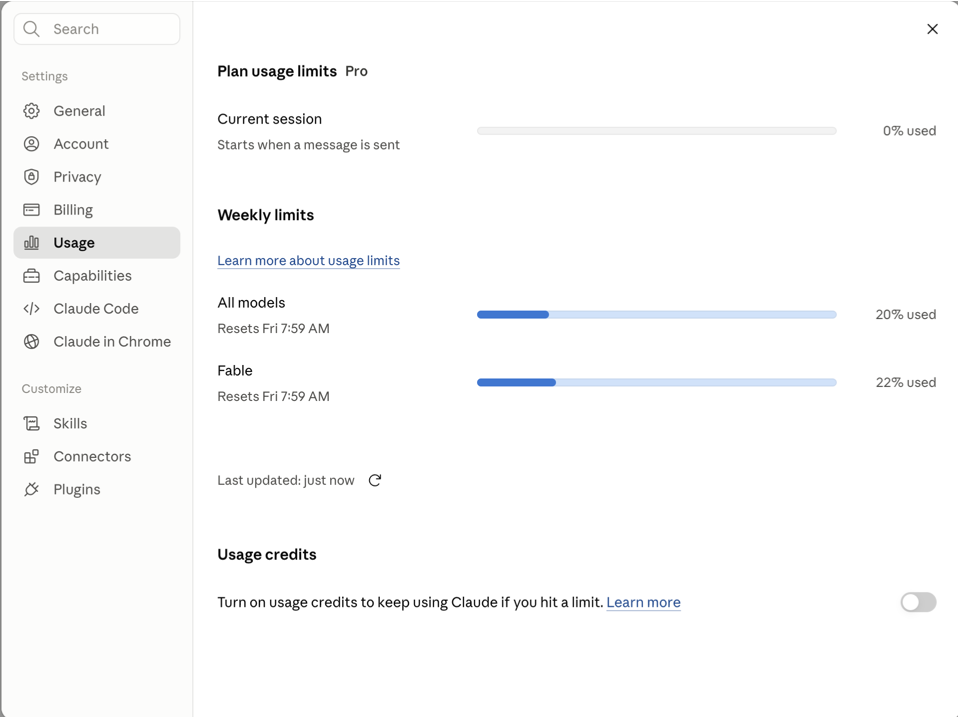
The usage-limit reality, stated plainly. Anthropic publishes no message counts. Limits work as a rolling budget over roughly five-hour sessions, with weekly caps on top, and they vary with model choice and message size, so two Pro users can hit their ceilings at different times. Anthropic loosened limits meaningfully in 2026, but the unpredictability itself is the legitimate complaint, and it is the single thing we would change about the product: in our use, a normal working day on Sonnet is comfortable, while heavy Opus-class sessions or long agentic Claude Code runs are what find the ceiling.
Is Pro worth it by persona? Freelancers: yes, almost unambiguously; two saved billable hours a month pays for it. Content creators: yes; Projects alone, for brand-voice persistence, justifies it for anyone managing multiple clients. SEO professionals: yes; the clustering, briefs, and technical workflows above are Pro-level usage patterns. Researchers: yes, on document capacity alone. Individual developers: yes, Claude Code’s inclusion makes Pro one of the cheapest serious AI coding setups sold; heavy daily coders will eventually want Max.
On value against alternatives: Pro is priced identically to the competing $20 tiers, so the choice is fit, not price. The inclusion of a full agentic coding tool at this tier is Claude’s standout value argument.
Claude Max
Price: Max 5x at $100 per month; Max 20x at $200 per month. Max is billed monthly only, with no annual discount.
The essential thing to understand about Max is what it is not: it is not a different product. You get the same models, the same features, and the same Projects as Pro. Max is headroom, roughly five or twenty times Pro’s usage budget, plus priority access to new features and models on the top tier. It exists because the answer to Pro’s biggest weakness, unpredictable limits interrupting heavy sessions, is not a settings toggle but a bigger bucket.
Who actually needs it: heavy daily Claude Code users, since long agentic coding runs are the fastest way through Pro’s budget, and at Max 20x rate limits stop being a practical concern for full-day development work; professionals running Opus- and Fable-class models for hours, where the heavier models drain the allowance several times faster than Sonnet; and anyone whose Claude usage would exceed the equivalent API spend, because a power user burning through millions of tokens weekly can genuinely come out ahead on the $200 flat rate versus pay-per-token pricing.
Who does not: most professionals. In our own daily use, a full working day on Sonnet with regular Projects work sits comfortably inside Pro, and the honest test is empirical, run a few representative days on Pro and see whether you hit the ceiling, because Anthropic publishes no message counts that would let you calculate it in advance. The structural complaint stands regardless: the jump from $20 to $100 with nothing between is the steepest pricing cliff in the category, and it is priced into the Value score. Upgrade when the limits tell you to, not before.
Claude Team Review
Price: Standard seats $20 per seat per month billed annually ($25 monthly); Premium seats $100 annually ($125 monthly). Minimum five seats, and beyond 150 seats Anthropic routes you to Enterprise. Seat types can be mixed on one account.
Team is Pro for organizations plus the layer businesses actually need: shared Projects and workspaces, so a team builds collective context instead of five private setups; central billing and admin controls, including which connectors members may use; SSO; and, importantly, no training on your content by default at the organizational level, which removes a per-user setting compliance would otherwise have to police. Premium seats add Max-level usage plus Claude Code and Cowork, designed for engineers and heavy users while lighter users sit on Standard.
Who should choose Team over Pro: any organization of five or more where AI use is becoming standard practice rather than individual experiment; teams where shared context is the point, agencies, product teams, research groups, because shared Projects turn individual AI use into institutional knowledge; and any company that has to answer a security questionnaire, where “everyone’s on personal accounts” is not an answer procurement accepts.
Who should not: solo professionals and duos, who cannot meet the seat minimum and are better served by Pro or Max, and compliance-heavy organizations needing audit logs, SCIM, and custom retention, which is Enterprise territory. The productivity math is company-specific, but the pattern from teams that adopt it well is consistent: the value is not “everyone chats with AI,” it is shared Projects becoming the place where messy institutional knowledge finally gets useful, and that is an organizational-change project, not just a subscription.
Claude Integrations and Ecosystem
Claude’s ecosystem in 2026 is substantially broader than its chat-only origins, though still more curated than its largest competitor’s sprawl.
First-party surfaces: the web app; desktop apps for Mac and Windows including Claude Cowork, an agentic desktop app that works with local files on multi-step tasks; iOS and Android apps that can also remotely drive Code and Cowork sessions; Claude Code in the terminal, VS Code, and JetBrains; and office-side agents, Claude in Excel, Claude in PowerPoint, and Claude in Chrome, a browsing agent that can act on websites.
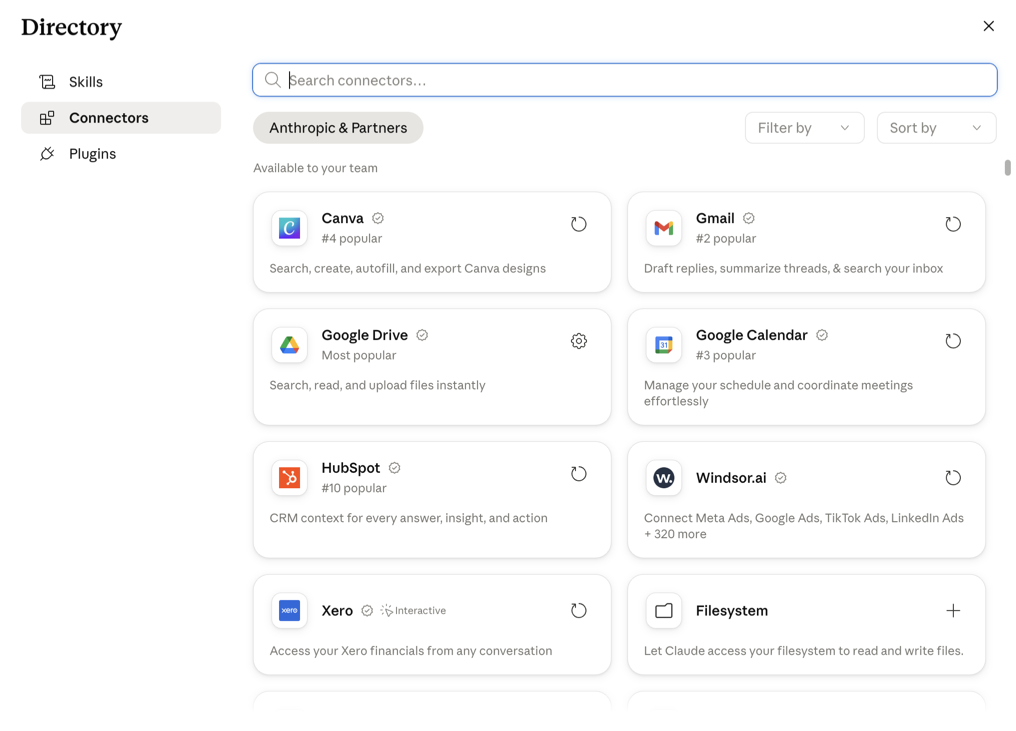
Connectors: Claude connects to Google Workspace (Drive, Calendar, Gmail), Slack, Notion, and a growing directory of services through the Model Context Protocol, with per-connector permissions admins can control on Team plans. In practice, Claude can search your Drive, check your calendar, or pull from company tools mid-conversation.
API: developers build on the same models via the Claude API and Claude Platform, with SDKs, batch processing at a discount, and prompt caching for cost control; a large share of third-party AI products run Claude under the hood.
The pattern Anthropic is pursuing is Claude where you already work, in the spreadsheet, the IDE, the browser, rather than pulling everything into a chat tab. It is not yet as ubiquitous as Copilot’s placement inside Office, and Gemini keeps home-field advantage inside Google apps, but the trajectory is toward parity, and MCP gives Claude an open standard the others have partially adopted too.
Claude MCP (Model Context Protocol) Explained
MCP may be the most consequential thing Anthropic has shipped that is not a model, so it earns a proper explanation.
The problem. An AI model, on its own, is sealed off from your world: it cannot see your files, your database, your project tracker, or your CRM. Historically, connecting an AI to each tool meant a custom one-off integration, expensive to build, brittle to maintain, different for every AI vendor.
What MCP is. The Model Context Protocol is an open standard, a universal connector, USB-C for AI. A tool builds one MCP server describing what it can do (“search these documents,” “create a task,” “query this database”), and any MCP-compatible AI can then use it. Anthropic open-sourced MCP in late 2024, and it has since been adopted well beyond Claude, including by other major AI providers, which is exactly what you want from a standard.
How it works in plain terms: a tool runs an MCP server exposing specific capabilities; Claude connects as a client; during a conversation Claude can call those capabilities, read a file, run a query, create a ticket, and use the results in its reasoning, with you approving what it may touch.
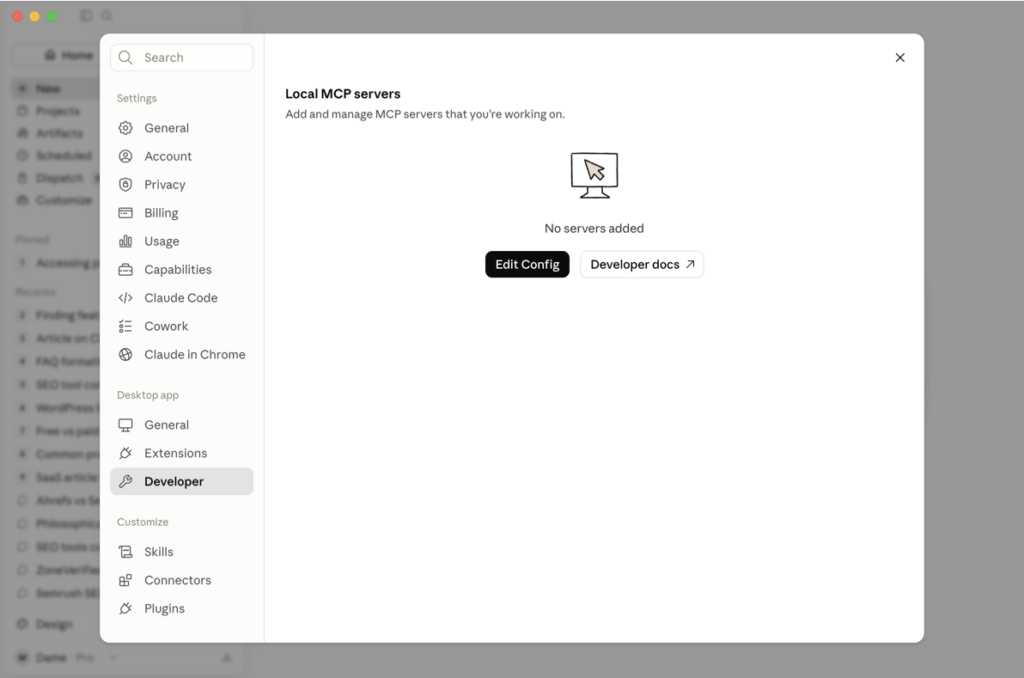
Real workflows: “look through my project folder and summarize what changed this week,” with Claude reading the actual files; an analyst connecting a read-only database server and asking questions in English while Claude writes the SQL; Claude Code using MCP servers to work with GitHub and CI during agentic sessions; a connected CRM answering “which enterprise accounts have open tickets older than a week?” from live data. In our own stack, this is also how Claude now drives our crawler directly, the Screaming Frog MCP server covered in that review.
Benefits: integrations become plug-and-play; one connector works across tools; AI shifts from answering questions to doing tasks in your systems. Current limitations, honestly: setting up custom servers is still developer work; connector quality across the third-party ecosystem varies; and every connection is a security decision, granting an AI access to live systems deserves the same caution as granting it to a new employee, including thinking about untrusted data the AI might encounter. Future potential: MCP is the plumbing of the agentic era, AI that completes multi-step work across your tools rather than chatting about it, and it is why Claude’s connectors menu keeps getting longer whether or not you ever configure a server yourself.
Claude Compared With Other AI Assistants (Overview Only)
A full comparison deserves its own article; this section is positioning only.
- Claude. Strongest at long documents, sustained complex reasoning, technical work, and writing quality. The pick when the depth of a single task matters: a big analysis, a hard coding problem, a document that has to be right.
- ChatGPT. The broadest ecosystem: native image generation, advanced voice, a huge plugin marketplace, and the largest community, meaning more tutorials and third-party support for any workflow you can name. For general-purpose, multimedia, and consumer use, breadth is a real advantage.
- Gemini. Wins on Google ecosystem integration. If your work lives in Gmail, Docs, Sheets, and Drive, its native placement plus aggressive pricing makes it the path of least resistance.
- Others. Microsoft Copilot for organizations committed to Microsoft 365; Perplexity for search-first research; open-source models for teams needing self-hosting and full control.
The practical takeaway: most professionals in 2026 do not ask “which AI is best?” but “which AI is best for this part of my workflow?”, and a growing number pay for two.
Read our detailed comparison: Claude vs ChatGPT (2026).
Claude Limitations and Drawbacks
No credible review skips this section. What genuinely frustrates Claude users:
- Opaque usage limits. No published message counts; a rolling budget that varies by model and message size, so caps can land mid-task. Limits improved through 2026, but the unpredictability is a fair complaint and the most consistent one in user consensus.
- Model churn. The lineup changes several times a year; models are renamed, superseded, or shift between plans. Power users adapt; teams standardizing workflows on a specific model find it wearing.
- The pricing gap. Pro is fairly priced, but heavy users face a jump from $20 straight to Max at $100–200 per month, with nothing in between, leaving some users rationing or overpaying.
- No native image generation, and no parity on real-time voice. Visual and voice-first work needs another tool.
- Ecosystem size. The connector directory grows quickly, but the largest competitor’s marketplace and community remain bigger; niche integrations often appear there first.
- It still gets things wrong. Claude hallucinates less than most, and “less” is not “never.” It can state a wrong fact confidently, misread a figure in a dense table, or produce plausible code with a subtle bug. Anything consequential needs human verification, true of every AI in 2026, and true of Claude.
- Occasional over-caution. It sometimes hedges or declines clearly benign requests, particularly in edgy creative or security-research contexts. Improved, but noticeable to users arriving from more permissive tools.
Pros and Cons
- ✓Best-in-class handling of long documents, large codebases, and sustained complex work, with answers grounded in the material you actually supplied
- ✓Consistently strong, natural writing quality with instruction-following that respects detailed briefs
- ✓Claude Code included in the $20 Pro plan, exceptional value for individual developers
- ✓Projects turn scattered chats into persistent, organized client and campaign workspaces
- ✓MCP gives Claude an open, industry-adopted integration standard, and business plans exclude your content from training by default
- −Usage limits are unpublished and unpredictable, and can interrupt heavy sessions mid-task
- −No native image generation and a smaller multimedia and plugin ecosystem than the largest competitor
- −A pricing cliff between Pro at $20 and Max at $100, with no intermediate tier
- −Frequent model renaming and lineup changes that complicate standardized team workflows
- −Direct support is documentation- and ticket-first, with no phone or live-chat channel on consumer plans
Who Should Use Claude?
Claude fits developers first, Claude Code plus strong reasoning on complex codebases makes it arguably the default choice for AI-assisted engineering in 2026. It fits SEO and content professionals, for whom Projects plus long context transform client work, briefs, clustering, refreshes, schema, and regex. It fits writers doing quality-first long-form work where voice consistency matters, researchers and analysts for whom multi-document synthesis is the job, and businesses and teams that want shared Projects, admin controls, and org-level training exclusion in one rollout. The unifying profile: anyone whose work is “read a lot, think hard, write something precise.” That sentence is essentially the product description.
Who Should Avoid Claude?
Skip Claude, or pair it with something else, if your needs sit outside its depth-first design. Ecosystem maximalists who value having a plugin, template, or community tutorial for everything will find the largest competitor’s marketplace bigger. Google- or Microsoft-anchored teams get deeper native embedding from Gemini and Copilot respectively; Claude integrates with both, but as a guest, not the host. Visual-first creators need image and video generation Claude does not offer. Voice-first users will find more advanced real-time voice elsewhere. Extremely price-sensitive high-volume API users running simple bulk tasks can undercut Claude’s per-token cost with cheaper models. And anyone allergic to change should know the model lineup and limits move several times a year.
Every ZoneVerified review is scored using the same weighted methodology applied across all software categories, with security assessed as a separate pass/fail gate. Because AI assistants are judged primarily by the quality of the work they produce, the framework maps our standard Data Quality & Accuracy category to AI Output Quality & Accuracy. We state that mapping openly so readers can understand exactly how each score is reached.
Whether the tool produces trustworthy, consistent results. We evaluate factual accuracy, hallucination frequency, faithfulness to supplied documents, reasoning quality, code correctness where applicable, instruction following, and consistency across repeated prompts. Where possible, we validate results through real-world tasks rather than marketing claims.
Capability depth across writing, research, coding, reasoning, image generation, agentic workflows, document analysis, and knowledge management, together with how well those features work as a cohesive product and which capabilities are reserved for higher tiers.
How quickly users become productive, how intuitive the interface feels, and whether usage limits, model selection, or workflow complexity create unnecessary friction.
What the tool delivers relative to its price, including subscription tiers, usage limits, premium model access, and how costs compare with realistic alternatives.
How well the platform connects with the rest of a professional workflow through native integrations, APIs, MCP support, automation platforms, and third-party connectors.
The quality of documentation, onboarding resources, community, and direct customer support, together with how support differs across plans.
Published security posture, privacy practices, certifications where applicable, data handling, retention policies, and AI training-data policies, verified against official trust documentation.
Scores are assigned independently for each category before the overall rating is calculated using the fixed weights above. Ratings are never adjusted to reach a preferred outcome. Every review clearly distinguishes conclusions based on first-hand testing from those based on official documentation and recurring user consensus.
Read our complete software review methodology.
AI Output Quality & Accuracy
Because output trustworthiness carries the heaviest weight in this rubric, it gets the deepest treatment, and Claude’s profile here is the reason the tool exists. Three behaviours define it in daily use. First, document grounding: hand Claude a long source and ask a pointed question, and the answer usually comes from the source rather than from a plausible blend of general knowledge, and when the document does not contain the answer, Claude tends to say so instead of improvising. Second, instruction following: detailed briefs, structural constraints, and exclusions get respected rather than half-followed, which is where most AI working sessions quietly fail. Third, calibrated uncertainty: Claude hedges where it is genuinely unsure, which is occasionally frustrating in copy and consistently valuable in analysis. In our own use these are the behaviours that separate it from alternatives, and user consensus across review platforms and practitioner communities describes the same profile, with reliability and reasoning quality the recurring praise.
Code correctness follows the same pattern: Claude reasons about causes rather than pattern-matching to forum answers, and its debugging suggestions carry visible diagnostic logic. Consistency across repeated prompts is strong for a probabilistic system, though not perfect, and the honest framing is that no LLM’s output is deterministic.
The boundaries that cap the score are equally clear. Claude still hallucinates, less than most, but “less” is not “never,” and it can state a wrong fact confidently, misread a figure in a dense table, or ship plausible code with a subtle bug. A 4.5 records the most trustworthy working profile we have tested in the category while refusing to imply the thing no AI review should: that trustworthy means verified. Consequential output still needs a human check, and the review says so wherever it matters.
Features
Assessed against the rubric’s capability areas, writing, research, coding, reasoning, image generation, agentic workflows, document analysis, and knowledge management, Claude is a study in deliberate asymmetry, the same shape as the strongest single-purpose tools in our other series. Across text, reasoning, code, and agentic work it has few peers: long-document analysis, a four-tier model lineup, Projects with persistent knowledge, Claude Code included at $20, Cowork for desktop knowledge work, web search, Artifacts, code execution, extended thinking, and the category’s defining integration standard in MCP. The pieces also cohere: Projects feed conversations, MCP feeds Claude Code, and the office and browser agents extend the same models into the tools where work happens.
What the rubric’s capability list exposes just as plainly is the absent surface: no native image generation, no video, and no parity with the leading real-time voice experiences. Nothing is credit-metered and no feature is gated behind Team or Enterprise apart from admin controls, but the heaviest models are effectively rationed by the usage budget on lower plans. A 4.0 records a tool that is the best in the category at its chosen surface while deliberately not covering the category’s full breadth, deep, not broad, and the buying decision lives in exactly that distinction.
Ease of Use
Claude has the gentlest ramp of any tool we have scored in any series: the chat interface is productive in the first minute, the free plan requires no card, and the interface stays clean as the feature set has grown. Consensus is consistent on this, and it is our experience too; nothing about the core product needs a tutorial, and features like Projects explain themselves.
The friction that keeps the dimension off the top of the scale is structural rather than visual. Usage limits are unpublished and behave as a rolling budget, so users learn their ceiling by hitting it, which is the single most consistent complaint in user consensus. Model selection asks newcomers to understand a four-tier lineup that renames itself several times a year, and the deeper surfaces, Claude Code, MCP configuration, custom connectors, are genuinely technical. A 4.25 records a product that is effortless at the centre with real complexity at the edges, and the limits opacity is priced here as well as in Value because it is a daily-use annoyance, not just a billing one.
Value
Pricing is verified directly against Anthropic’s pricing page. The free plan is a genuine trial with a daily allowance and no card. Pro at $20 per month, about $17 billed annually, is the densest $20 in the category: the full model lineup, unlimited Projects, web search, Artifacts, connectors, and, decisively, Claude Code, an agentic coding tool competitors position as a separate product. Max at $100 or $200 per month sells headroom rather than features, and Team matches Pro’s per-seat price at $20 annually while adding the organizational layer, with $100 Premium seats for heavy users.
The counterweights are structural and keep the score honest. The jump from $20 to $100 with nothing between is the steepest pricing cliff in the category, and because limits are unpublished, a buyer cannot calculate in advance which side of it they fall on; the only honest test is empirical. Per-seat costs scale linearly for teams, and Max’s monthly-only billing forgoes the annual discount the other plans offer. A 4.25 records category-leading value at the tier most readers will buy, held below the top by the cliff above it and the opacity around it.
Integrations
For a product whose competitor sells breadth, Claude’s integration story is unexpectedly strong, and it rests on an open standard rather than a walled marketplace. MCP, released by Anthropic in late 2024 and since adopted well beyond it, is the category’s defining integration architecture, and it is why the connector directory, Google Workspace, Slack, Notion, and a growing list, keeps lengthening without bespoke engineering per tool. The first-party surface is equally current: desktop and mobile apps, Claude Code in terminals and IDEs, agents inside Excel, PowerPoint, and Chrome, and a full developer API with SDKs, batch processing, and prompt caching. In our own stack, Claude now drives our technical crawler directly through the vendor’s MCP server, which is the kind of workflow the standard was built for.
The boundaries: the third-party ecosystem is still the smaller one, niche integrations often appear on the largest competitor’s marketplace first, and inside Google’s and Microsoft’s own suites Claude integrates as a guest while Gemini and Copilot are the hosts. Custom MCP servers remain developer work. Crediting the standard itself as a genuine category first, a 4.25 is earned.
Customer Support
Support is Claude’s weakest dimension, and the shape of it is a documentation-first company. The self-service layer is strong: an extensive help center, current product documentation, prompting guides, and release notes, plus one of the largest user communities in software, where an answer to almost any workflow question already exists. Direct human support is another matter on consumer plans: contact runs through written channels only, with no phone or live chat, and response expectations scale with plan tier, with priority handling reserved for business and enterprise customers.
Nothing in consensus resembles serious billing or refund friction, and the documentation quality genuinely reduces how often direct contact is needed. But an individual Pro subscriber with an account or product problem is largely on their own with the help center and a ticket queue, and for a $20-to-$200 consumer product line that is a real gap against the rubric. A 3.5 records excellent self-service wrapped around thin direct channels, the lowest dimension in this review, and the score the current consensus supports.
Security
Claude’s security assessment rests on three verifiable pillars. First, Anthropic publishes trust documentation covering its security posture, and its commercial plans, Team and Enterprise, exclude customer content from model training by default at the contract level, removing a per-user setting compliance teams would otherwise have to police. Second, Enterprise adds the governance layer larger organizations require: SSO, audit logs, SCIM provisioning, and custom data-retention controls, per the vendor’s own plan documentation. Third, the connector architecture puts integration permissions under user and admin control, and on Team plans administrators decide which connectors members may use.
The honest boundaries: certification specifics should be read directly from Anthropic’s trust documentation rather than assumed, and any organization connecting Claude to live systems through MCP is making access-control decisions the vendor cannot make for it, an AI with tool access deserves the same scrutiny as a new employee with system credentials.
Security gate: Pass, posture-based, with direct verification of Anthropic’s current trust documentation and privacy policy required before publication.
Final Recommendation
Claude’s 4.2 is earned in the two places that matter most for an AI assistant. AI Output Quality & Accuracy at 4.5 records the most trustworthy working profile in the category, answers grounded in the documents you supply, code that reasons rather than pattern-matches, and a visible willingness to admit uncertainty, capped below the top of the scale for the one reason no AI review should soften: it still gets things wrong, and consequential output still needs a human check. Value at 4.25 records the densest $20 in the category, a full model lineup, Projects, and an agentic coding tool competitors sell separately, held down by the unpriced cliff between Pro and the $100 Max tier and by usage limits the vendor declines to quantify.
The counterweights are equally clear. Features at 4.0 records category-leading depth across a deliberately text-and-code-shaped surface, with no native image generation and no voice parity, deep, not broad. Support at 3.5 is the lowest dimension, reflecting a documentation-first company whose direct channels are written-only on consumer plans. Integrations at 4.25 credits MCP as a genuinely category-shaping open standard while acknowledging the third-party ecosystem is still the smaller one.
Is Claude worth paying for?
For professionals whose work is reading, writing, analysis, or code: yes, and Pro is the plan to start with, ideally annual at roughly $17 a month, after a week of real work on the free plan. Who benefits most? Developers, for whom Claude Code alone justifies the price; SEO and content professionals, for whom Projects change client work; and researchers, for whom the document handling is unmatched at this price. Which plan is best value? Pro, decisively, for individuals; move to Max only when you are consistently hitting Pro’s limits, the limits themselves will tell you. For organizations of five or more, Team Standard matches Pro’s price while adding the admin layer, with Premium seats for the heavy users. Who should consider alternatives? Multimedia creators, voice-first users, and teams anchored in Google’s or Microsoft’s ecosystems should evaluate Gemini or Copilot first, and plenty of professionals will sensibly run Claude alongside one rather than choosing.
The bottom line: Claude in 2026 is the specialist that became good enough to be a generalist without losing the specialty. If depth of work is what you are buying AI for, it is the strongest recommendation in the category.
About the Author

Mademoiselle Jove, Senior Editor, ZoneVerified
Mademoiselle Jove is the Senior Editor at ZoneVerified. With over eight years of professional experience in SEO, technical SEO, content strategy, and digital marketing, she specializes in evaluating software through the lens of real business workflows. Her experience includes building SEO systems, managing large-scale content operations, conducting technical audits, and working with a wide range of productivity, analytics, marketing, and project management tools. She oversees ZoneVerified’s editorial standards to ensure every review is accurate, transparent, and genuinely useful.
Editorial Independence: ZoneVerified publishes independent reviews based on research, editorial analysis, and genuine hands-on experience where applicable. Our recommendations are never influenced by compensation or commercial relationships.